Tracking sequence numbers and flags in Wireshark

Tracking sequence numbers and flags in Wireshark

One of the things I learned a while back was a really good tip when using Wireshark. I find people sometimes get tied up tracking the sequence numbers and the wireless frame flags in Wireshark.

Having to open the frames and look for flags and following sequence numbers can be quite complex and time consuming.

Here’s a Wireshark Tip

Here is a little tip I learned, which seems so obvious once someone tells you…

When viewing the frames in Wireshark, the “Info” column can be very informative. It shows the type of frame, and the sequence number (SN). It also shows the SSID name, the Beacon Interval (BI) and also the Flags from the wireless frame header.

One exception to this standard “info” field display is, if you have data that is not encrypted, Wireshark may start to show you the TCP/UDP or HTTP information in the “info” field, then you do have to go and dig, and look inside the frame to see the flag details. Basically, on an unencrypted Wireless network, or if you have entered the PSK intentionally so as you can decrypt packets, this may display actual packet data, not “useful wifi info”.

If we take a look in Diagram 1 below, you will see the Flags are listed underneath the “Flags” section within the “Frame Control Field”. You can also find a summary right next to the “IEEE 802.11 Beacon Frame” section (in fact whatever the type of frame you are viewing, the flags are summarized next to this section). A feature that often goes unnoticed, they are also summarized in the top right section of the Wireshark Frames display, within the “info” field.
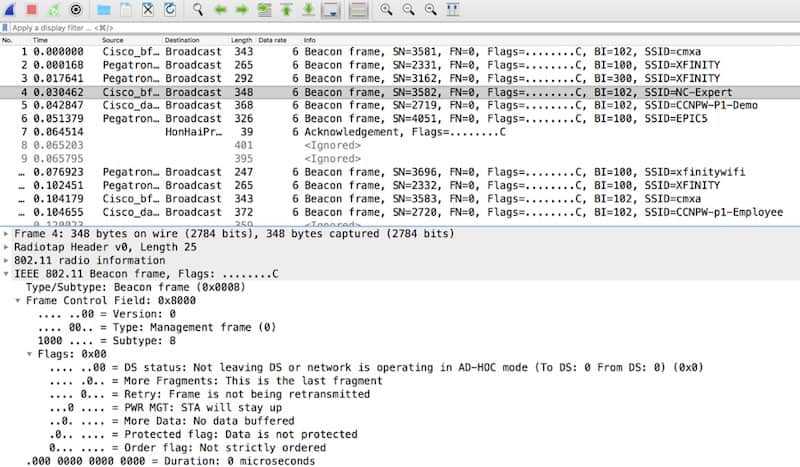
 

DIAGRAM 1


When the flags are shown next to the “IEEE 802.11 Frame” field (where represents the type of frame shown) or when show within the “info” column, the frame flags are listed using the following format: xxxxxxxxC, where the x’s represent characters that are displayed. The format is displayed as a mix of eight letters followed by an uppercase “C”. If a given flag is not set, it is represented as a period. As you can see in Diagram 1, none of the flags are set, and so the flag field will be represented as eight periods followed by an uppercase “C”.

The eight flags are shown as the following letters in this order: opmPRMFTC

o is the Order bit
p is the protected bit
m is the More Data bit
P is Power Management
R is Retry
M is More Fragments
F is FromDS
T is ToDS

That’s the eight flags!

Well, what’s the “C” then, I hear you ask.

A lot of people misunderstand this, and mis-name this uppercase “C”.

The “C” is there as long as the frame did not fail its CRC check. Now please note this is not the same as the frame passing its CRC check. If for whatever reason the CRC is not present (maybe because you only captured a small segment of the frame e.g. 128B, or you didn’t capture FCS’), Wireshark represents this with an uppercase “C”. This happens whether the frame is corrupt or not and can be quite confusing. So, watch out for that one!

2025 Update...

We talk about this, more, in our AMA series webinars:

https://www.youtube.com/watch?v=TM70jXEsFsk


That’s it for this month. See you next time.

If you are looking to make your mark in the IT Industry, then NC-Expert offers excellent training courses aimed at relevant IT industry certifications – contact us today to get started.

NC-Expert Blog

By Admin February 2, 2026
In today’s fast-evolving IT landscape, professionals who continuously expand their technical capabilities stand out in increasingly competitive promotions and job markets. Among the areas experiencing explosive growth, wireless networking has emerged as a cornerstone of modern infrastructure. From enterprise Wi-Fi deployments, to mission-critical IoT systems, and pervasive mobile connectivity, wireless skills are now indispensable for ambitious IT engineers. Earning certifications in wireless networking doesn’t just validate your knowledge, it catalyzes your career progression by opening doors to higher-level roles, deeper specialization, and accelerated professional recognition. In this blog, we’ll explore how wireless certifications, especially those from CWNP and CompTIA, help IT engineers develop from fundamental understanding to true experts in wireless technologies. Why Wireless Expertise Matters for IT Engineers Empty heading Wireless networks are no longer optional; they’re essential. Modern enterprises rely on Wi-Fi for daily operations in offices, retail environments, hospitals, campuses, and logistics centers. Technologies like Wi-Fi 6E and Wi-Fi 7 are pushing performance and reliability to new heights, while trends such as IoT, industrial automation, and edge computing broaden the scope of wireless connectivity. This rapid growth has created a global demand for professionals who can design, secure, troubleshoot, and optimize wireless networks. As organizations prioritize mobility, reduce hardware overheads, apply digital transformation initiatives, and implement high-density connectivity, engineers equipped with wireless expertise are increasingly valuable. Certified professionals not only understand the theory but can apply it in real-world environments: a difference that employers are willing to reward with better roles, more responsibilities, and higher compensation.
By Rie January 5, 2026
For more than two decades, Wi-Fi has quietly evolved from a convenience technology into a mission-critical utility. Now we’re in 2026, we can look back at 2025 and review wireless connectivity which underpinned nearly every digital experience: from enterprise productivity and cloud services to healthcare, education, retail, manufacturing, and smart infrastructure. Against this backdrop, Wi-Fi 7 (IEEE 802.11be) has emerged as the most ambitious leap forward yet. But as with every new wireless generation, the real story of Wi-Fi 7 in 2025 was not just about theoretical speeds or marketing headlines. It was about adoption, operational reality, and practical impact, and what IT engineers needed to understand as networks transitioned from Wi-Fi 6/6E into the next era.
By Admin December 5, 2025
Nice to Have vs. Essential Empty heading Empty heading Wireless networking is no longer a “nice to have” skill... it’s mission-critical. From healthcare and education to enterprise, manufacturing, and public safety, organizations depend on reliable, secure, and high-performing Wi-Fi. As a result, employers are looking for professionals who don’t just know Wi-Fi, but understand how to design, deploy, secure, and troubleshoot it effectively. Empty heading pty heading So, what specific skills are employers looking for, and how can professionals demonstrate they have them?  Below are the top 10 Wi-Fi skills in demand today, and how CWNP® (Certified Wireless Network Professional) training helps deliver each one.