

Blog

More spectrum, fewer headaches? If only RF engineering were that simple. There's something undeniably exciting about 6 GHz Wi-Fi... after years of squeezing increasingly demanding networks into the crowded 2.4 GHz and 5 GHz bands, engineers finally have access to a substantial amount of additional spectrum. More channels. Less legacy interference. Wider channel options. It's almost enough to make a Wi-Fi engineer believe that life is about to get easier! Well, almost... because somewhere between the marketing presentations and the real-world deployment, a dangerous assumption has emerged: with all that extra spectrum, careful RF design isn't nearly as important anymore. Unfortunately, nobody informed the laws of physics.
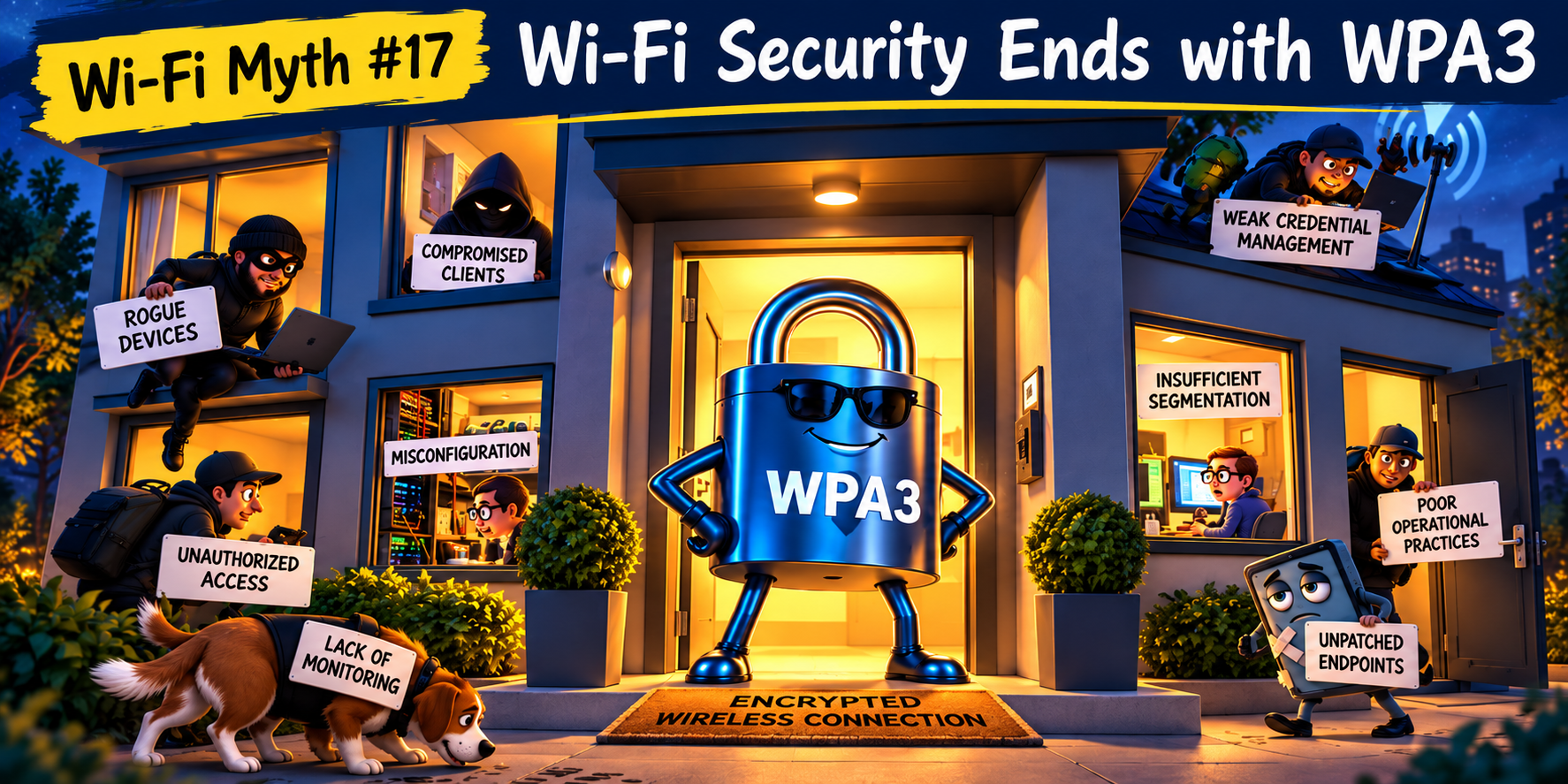
Protecting the wireless connection is only part of protecting the network. WPA3 was a welcome advancement in wireless security. Stronger authentication, improved protection against password guessing, and more robust cryptographic mechanisms gave Wi-Fi engineers plenty of reasons to celebrate. And rightly so. But, somewhere along the way, an interesting assumption crept into the conversation: if a network uses WPA3, it must be secure. Well… not quite. WPA3 is an important security mechanism, but it isn't a complete security strategy. It protects specific aspects of wireless communication, but not every device, user, configuration, or operational decision involved in running a wireless network. And, as experienced Wi-Fi engineers know, trouble rarely confines itself to one convenient layer of the network.

A beautiful dashboard doesn't necessarily mean a beautiful network. There is something wonderfully reassuring about a wireless LAN controller dashboard: everything is neatly organized; access points are green; clients are connected; channel assignments look sensible; the controller reports that Radio Resource Management (RRM) is optimizing the environment; and the health score is sitting comfortably in the high nineties.... life is good. Uhmm... except that users are complaining about dropped calls, sluggish applications, and mysterious connectivity problems. But the dashboard says everything is fine! Welcome to Wi-Fi Myth #16: The Controller Knows Best. Modern wireless controllers are remarkably sophisticated. They collect enormous amounts of information, automate complex decisions, and provide visibility that engineers could only dream of a couple of decades ago. But there's an important distinction between collecting information and understanding what's actually happening in the RF environment... and that's where things get interesting.
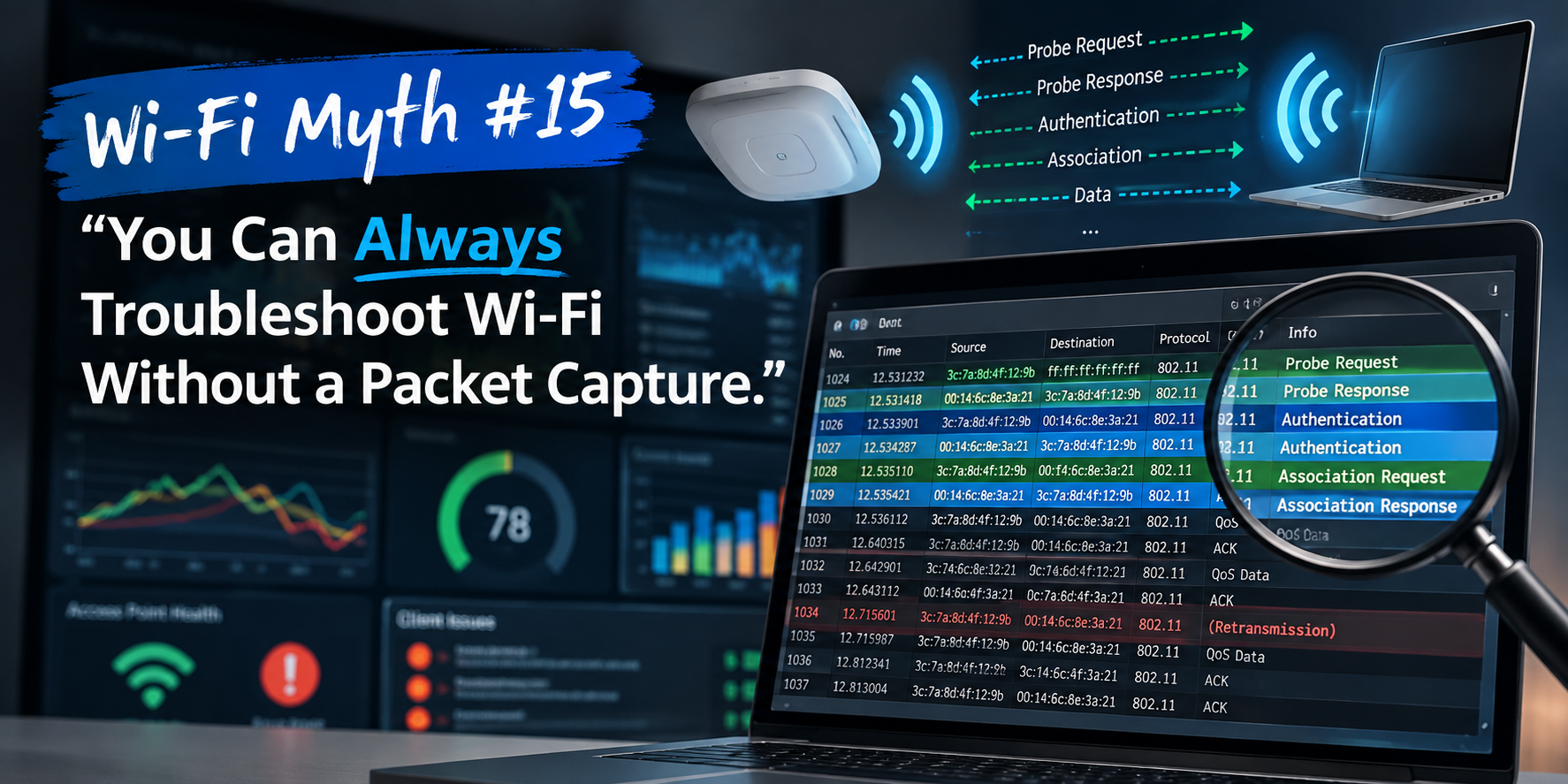
Modern Wi-Fi systems give us an impressive amount of information. Dashboards show signal strength, channel utilization, retry rates, client health scores, roaming events, application performance, access point statistics, and enough colorful graphs to make almost any troubleshooting session feel reassuringly scientific. And all of that information is useful. I’ll freely admit that most Wi-Fi problems can be investigated without immediately reaching for a packet analyzer. But “most” and “always” are very different words. There comes a point when a Wi-Fi engineer has to stop asking what the dashboard thinks happened, and start looking at what actually happened over the air. This is where packet captures enter the discussion. A packet capture is not required for every Wi-Fi problem. If an AP has lost power, you probably don’t need Wireshark to confirm your suspicions, but when the problem involves association, authentication, roaming, retries, retransmissions, connectivity, intermittent performance, or strange client behavior, packet analysis can turn speculation into evidence . Sometimes, you simply need to see the conversation, and what really happened, to resolve the issue.

We’ve all seen it happen: someone reports that the Wi-Fi is slow. A speed test is launched. The little needle races across the screen and, a few seconds later, an impressive number appears. “See? 600 Mbps. The Wi-Fi is fine.” Case closed. Except, of course, it isn’t. A speed test can be useful. It can tell you something about the performance experienced by a device at a particular location, at a particular moment, using a particular test server and network path. What it cannot do is provide a complete diagnosis of Wi-Fi health. That distinction matters because throughput is only one part of the user experience.

Mesh Wi-Fi has developed quite the reputation: Need coverage in the far end of the building? Mesh. Can’t get Ethernet to an access point? Mesh. Dead spot upstairs? Mesh. Need Wi-Fi in the warehouse, courtyard, annex, garage, loading dock, or that mysterious conference room where RF signals apparently go to die? Mesh. And there’s a reason for the enthusiasm. Mesh networking can be extremely useful: it can extend connectivity into places where running cable is difficult, expensive, disruptive, or simply impossible. Modern mesh systems can dynamically select paths, recover from connectivity changes, and provide remarkably capable wireless backhaul... but that doesn’t mean mesh is automatically the best architecture. Sometimes the best mesh network is the one you don’t build!

Automatic Channel Selection sounds like one of those features we should simply be able to trust: the APs monitor the RF environment, the Controller gathers data, an Algorithm considers interference, utilization, neighboring APs, channel availability, and other metrics, then Radio Resource Management (RRM) does its “thing” and selects the best channels. Wonderful! One less problem for the wireless engineer to worry about... except RF rarely cooperates with anything quite that neatly! Modern RRM systems are remarkably capable, and automatic channel selection can dramatically simplify the management of large wireless environments, but an algorithm can only make decisions based on the information it collects, the parameters it has been given, and the objectives it has been designed to optimize. That makes automation a powerful engineering tool. It does not make it the engineer.
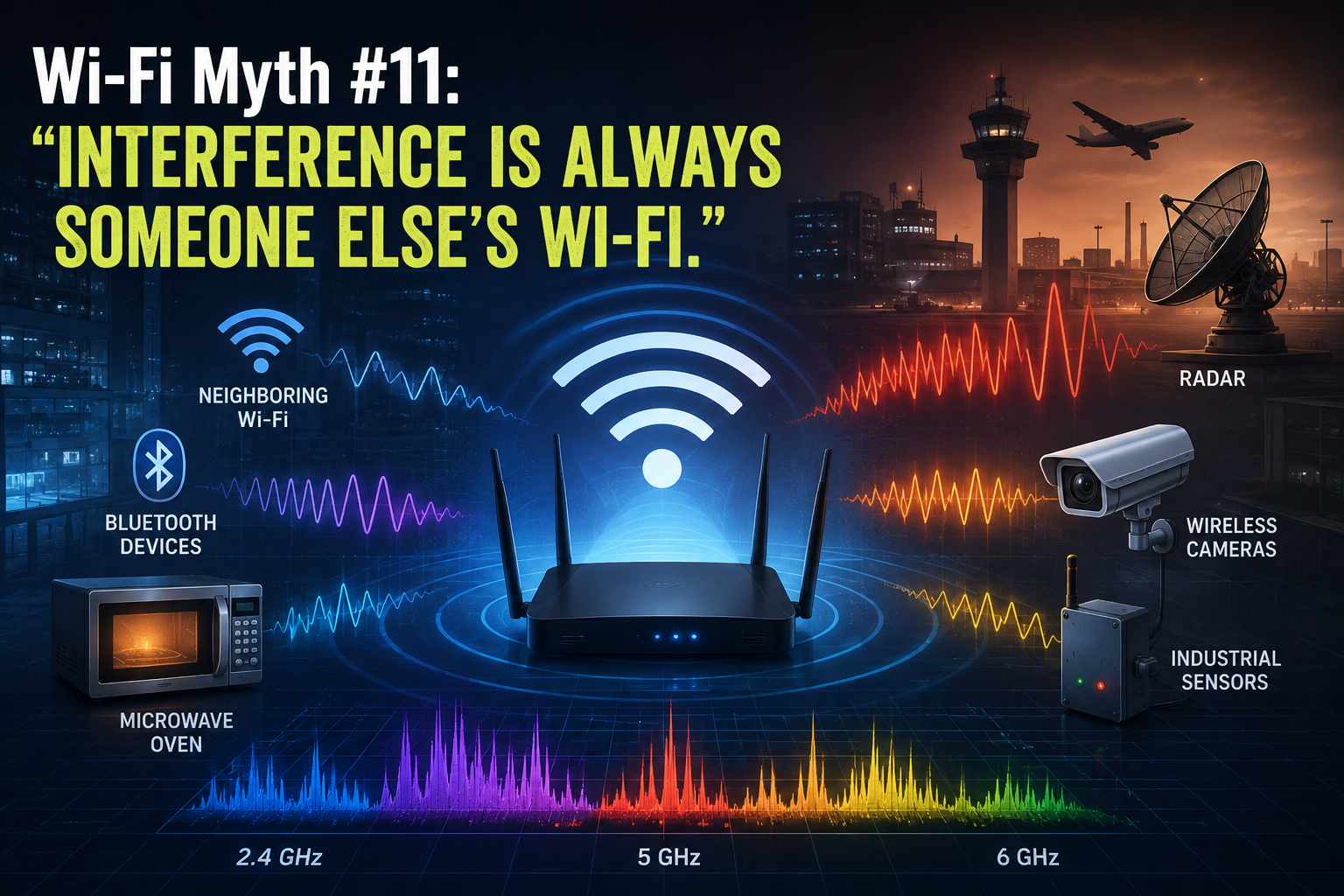
When Wi-Fi performance suddenly deteriorates, interference is often the first culprit to be suspected and, when this (interference) enters the conversation, attention tends to turn immediately toward neighboring Wi-Fi networks. “Someone must have installed another AP.” “The office next door is probably using our channel.” “There are too many SSIDs around here.” Sometimes, this diagnosis is exactly right, but RF interference has a much larger cast of characters than just neighboring APs. In fact, some of the most frustrating wireless problems occur when the interfering device isn’t speaking 802.11 at all! The spectrum doesn’t particularly care whether the energy occupying it came from an enterprise AP, a Bluetooth headset, a microwave oven, or something considerably stranger. To a Wi-Fi radio trying to communicate, unwanted RF energy is simply unwanted RF energy. Wi-Fi Has to Share the Neighborhood The 2.4 GHz band has always been something of an RF “community center”. Wi-Fi operates alongside Bluetooth, Zigbee and other technologies, while various consumer, industrial, medical, and electronic devices may also generate energy within or around the same spectrum. Microwave ovens are perhaps the most famous example. Their emissions can interfere with 2.4 GHz Wi-Fi, particularly when clients are operating nearby. Bluetooth devices, cordless equipment, wireless cameras, sensors, and other transmitters can also contribute RF energy. Some interferers transmit continuously. Others appear periodically. Some hop frequencies. Others produce wideband noise. That last category can be particularly entertaining to troubleshoot... in the very specific sense of “entertaining” that wireless engineers use when they have been staring at spectrum analysis for three hours! The important point is that interference doesn’t need to understand Wi-Fi to disrupt it.
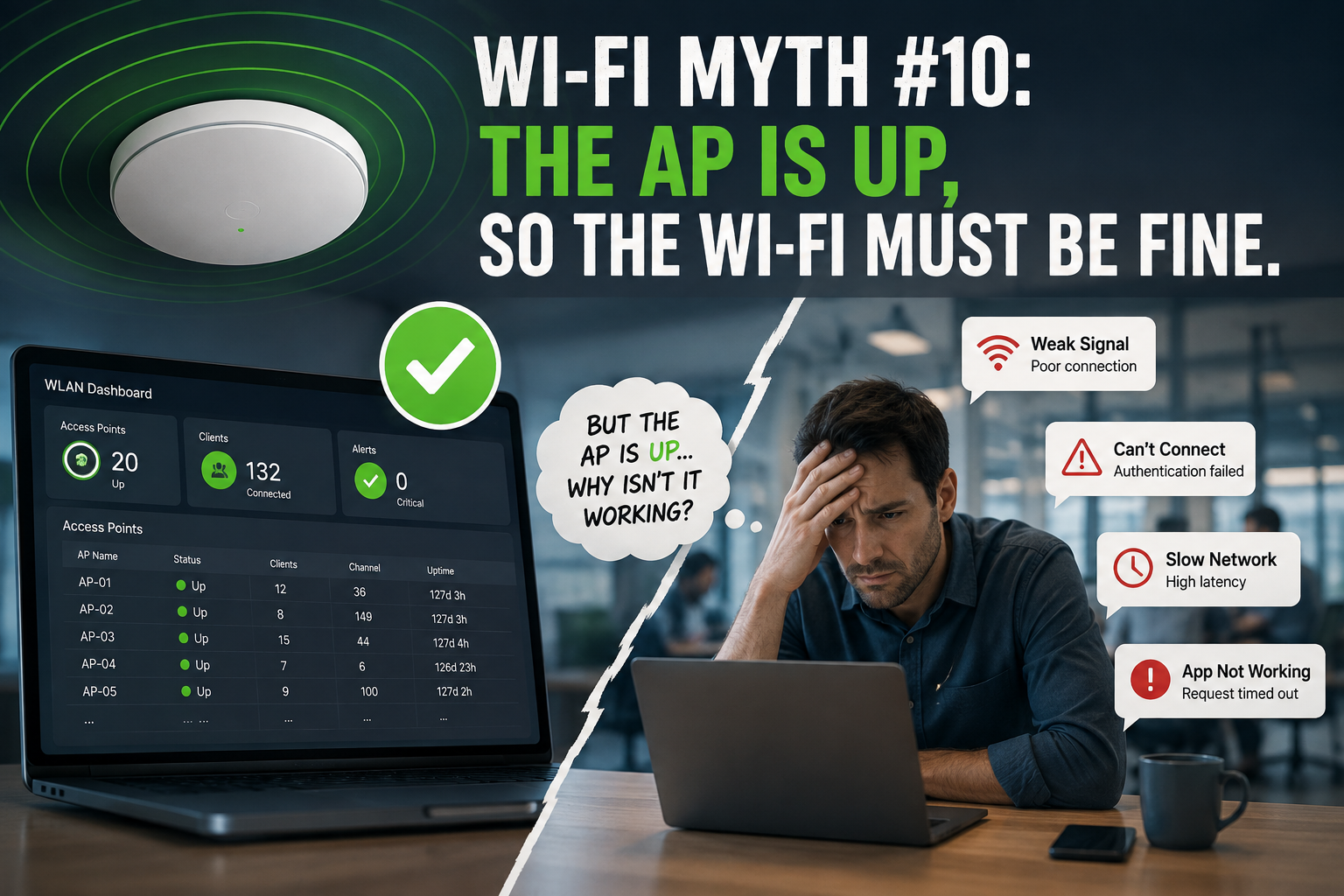
There is something wonderfully reassuring about seeing a row of green APs on a wireless dashboard: APs connected; radios operational; no obvious alarms; everything green. Excellent! The Wi-Fi must be fine... Except, of course, the users are complaining that Teams calls are breaking up, handheld scanners keep disconnecting, authentication takes forever, and someone in Accounting has discovered that turning Wi-Fi off and back on again temporarily fixes everything. Welcome to one of the more persistent myths in enterprise wireless: if the AP is up, the Wi-Fi must be working. An operational AP tells us something useful... but it tells us surprisingly little about the experience of the clients actually using the network. “Up” is an Infrastructure State When a monitoring platform reports that an AP is up, it usually means the infrastructure can communicate with it. It tells us: - the AP has power - its Ethernet connection is functioning - it may have established its management or CAPWAP connection - its radios are probably operational - it hasn't disappeared into the networking equivalent of a “black hole” ...all good things. But none of those things proves that a client can successfully use an application. Consider what still has to happen after the AP proudly announces its existence. A client must: discover the WLAN associate authenticate obtain the appropriate network configuration reach its default gateway resolve DNS access the required network resources, and maintain sufficient RF performance to exchange data reliably. Depending on the environment, that journey may involve: 802.1X RADIUS DHCP DNS VLANs ACLs firewalls roaming mechanisms upstream switching WAN connectivity cloud services ...and several other systems waiting for their opportunity to make your afternoon more “interesting”. ;-) The AP actually being operational is merely one part of that chain!
