Coverage vs. Capacity in Wi-Fi Design: Two Sides of the Same Wireless Coin
If you’ve ever set up Wi-Fi at home, you know the goal is simple: get all your devices online and ruin your neighbor’s day by having a faster signal! But when you move into the professional world of Wi-Fi design, particularly for offices, schools, stadiums, or coffee shops with way too many laptops, that simple goal morphs into something far more complex.
Every Wi-Fi design engineer quickly learns the eternal truth of wireless networking: coverage and capacity are not the same thing. They might sound like twin siblings, but they behave more like cousins who only get along at family reunions. Understanding the difference, and designing for both, is what separates an average Wi-Fi deployment from a user experience meltdown.
Let’s break it down.
What is Coverage?
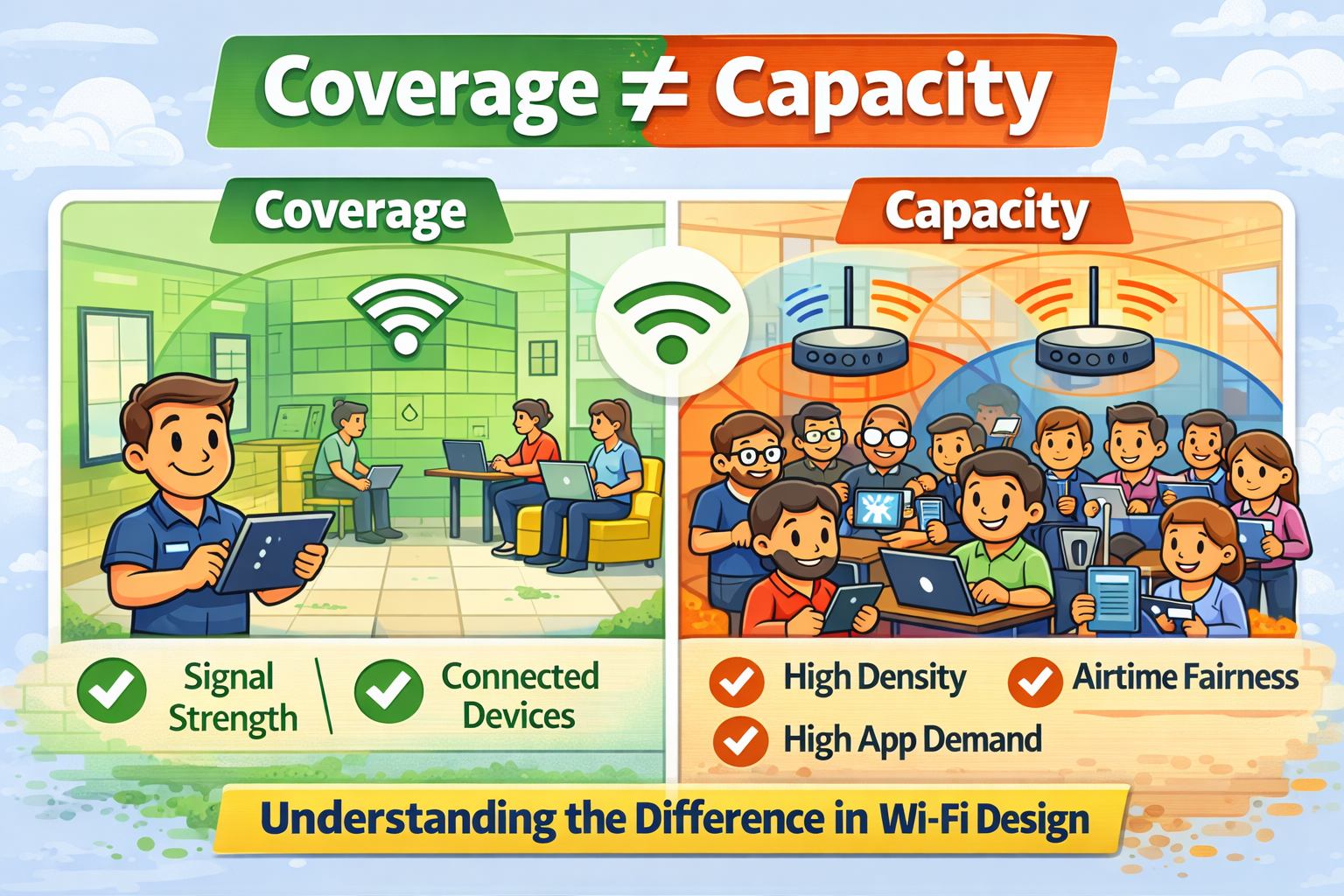
Coverage is the easy part to visualize. It’s where the Wi-Fi signal reaches: The area where your device can detect and connect to an access point (AP). Think of it like Wi-Fi’s version of a spotlight. If you’re standing in the light, you can see (or in this case, connect). Step out of the beam, and everything goes dark... or your Zoom call freezes mid-sentence.
For Wi-Fi design engineers, the goal of coverage planning is making sure that every part of the intended area (every office, classroom, hallway, and maybe even that sneaky stairwell) gets an adequate signal. Adequate doesn’t mean just any signal, though. The received signal strength indicator (RSSI) should typically be better than -67 dBm for most enterprise applications, to ensure reliable performance.
In the early days of Wi-Fi, “coverage everywhere” was the holy grail. Designers would slap a few APs around the building, check for signal, and call it a day. And yes, users could connect but, once more people joined, performance tanked faster than your home router on movie night when everyone’s streaming their own show.
That’s because coverage alone doesn’t account for how many devices are connecting, or how much data they’re demanding. Enter, capacity...
What is Capacity?
Capacity is where Wi-Fi design moves from “Can I connect?” to “Can I stay connected *well* while everyone else does too?”
Capacity is all about how much data the network can handle in a given area. It’s concerned not with where the signal reaches, but how many clients are using it and how much traffic they’re generating. For instance, a classroom with 30 students all streaming educational videos (and probably a few non-educational ones) has wildly different capacity needs than an empty hallway that just requires occasional coverage for a tablet-based inventory app.
It’s similar to roads and traffic. Coverage is having roads everywhere; Capacity is having enough lanes so traffic doesn’t back up. You can have full geographic coverage of a city with one-lane roads, but during rush hour, it will be chaos. The same goes for Wi-Fi: too many users, not enough wireless “lanes,” and everything slows down.
That’s why capacity planning looks beyond just signal strength. Engineers need to consider:
• Number of concurrent users in the area.
• Types of devices (laptops, smartphones, tablets, scanners).
• Application bandwidth requirements (such as streaming, video conferencing, or VoIP).
• Network throughput and spectrum utilization.
• AP hardware capabilities and channel width.
If coverage makes sure everyone’s invited to the party, capacity ensures there’s enough pizza for everyone.

Why Both Matter
You can’t design a Wi-Fi network based only on coverage: that would be like building a hotel with enough rooms but only one tiny elevator. (And, yes, I’ve lived through that experience!) Conversely, focusing on capacity and forgetting coverage would be like putting a massive elevator in one corner of the building and expecting everyone to somehow find their way to it.
Here’s how they complement each other:
• Coverage ensures connectivity: devices can detect and reach a Wi-Fi network wherever they need to work.
• Capacity ensures performance: the network can handle all connected devices smoothly, even during busy times.
A great Wi-Fi design balances both, ensuring signals blanket the right areas, and that each area can support the expected client load.
This is why modern Wi-Fi design tools (like Ekahau and Hamina) don’t just show colorful maps of signal strength. They also include capacity simulations that predict user experience under load. It’s not enough to color the map green... you’ve got to make sure it stays green when 300 people simultaneously start watching funny cat videos!

Common Mistakes in Wi-Fi Design
Even new IT engineers, eager to see those clean signal maps, can fall into some of the following traps:
• Over-relying on AP transmit power.
Turning up the power doesn’t solve capacity issues. It often creates interference problems.
• Ignoring channel planning.
Overlapping channels cause contention, degrading capacity (even if the RSSI looks strong).
• Using too few APs.
Saving money upfront might mean User complaints later.
• Designing for best-case scenarios.
Real-world environments change: they may add people, furniture, or new devices... causing performance shifts.
The moral of this story? A good Wi-Fi design needs to encompass both science and skepticism: always question whether your design plan handles both coverage area
and client load.

Wise Words...
So, the next time someone asks if your Wi-Fi network has “good coverage,” politely smile and say, “Yes, but let’s also talk about capacity.” Because great Wi-Fi design is not just about where your signal goes... it’s about what happens when the crowd shows up.
For new IT engineers, the sooner you internalize that Coverage and Capacity are co-stars (not competitors), the better your Wi-Fi designs will be, and the fewer angry “the Wi-Fi sucks!” tickets you’ll have to troubleshoot!
After all, in the world of wireless, signal strength gets you connected... but capacity keeps you happy. :)
===
===
Learn More
If you want to learn more about our wireless training and wireless networks, visit our training portfolio page here
===
#WiFi #WirelessNetworks #Cybersecurity
===
About NC-Expert
NC-Expert is a privately-held California corporation and is well established within the Wireless, Security, and CyberSecurity industry certification training, courseware development, and consulting markets.
NC-Expert has won numerous private contracts with Fortune level companies around the world. These customers have depended on NC-Expert to train, advise, and mentor their staff.
So remember, if you are looking for the best IT training just call us at (855) 941-2121 or contact us
NC-Expert Blog