Know Your Tech
Meet the Team: Repeaters, Hubs, Bridges, Switches, Modems, Gateways, and Access Points
When you first step into networking, the equipment can feel like a cast of characters in a technical drama. Each device has a role. Some are veterans from networking’s early days. Others are modern specialists. Together, they form the backbone of how devices communicate.
Let’s meet the team, and understand how they work together in real networks...
Repeater
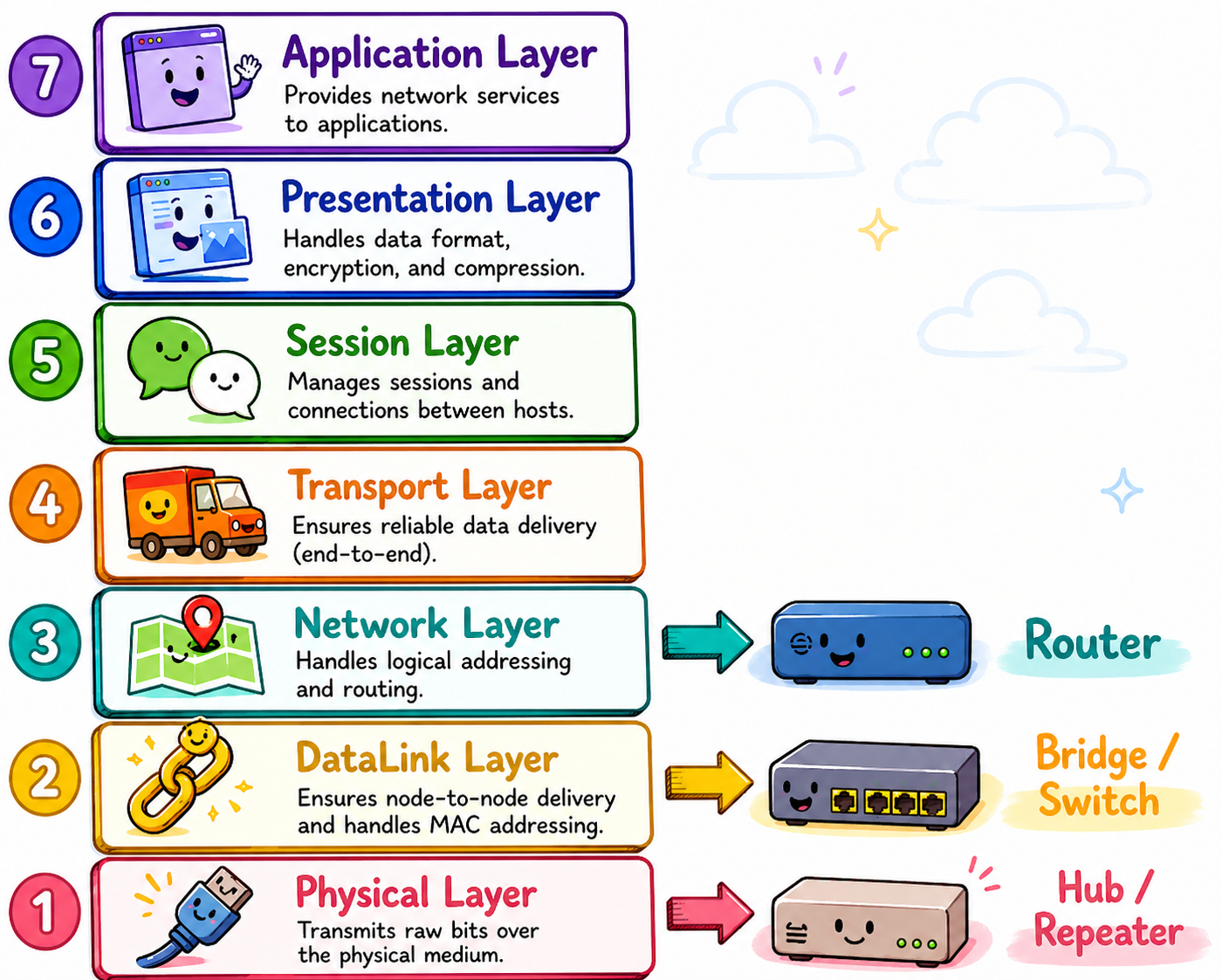
A repeater operates at Layer 1 (Physical Layer) of the OSI model. Its job is simple: regenerate weak signals so they can travel farther.
Imagine shouting across a long hallway. A repeater is the helpful colleague halfway down who repeats your message loudly so the person at the far end hears it clearly. Repeaters don’t understand traffic. They don’t filter it. They simply boost signals.
Best use: Extending cable runs or wireless coverage where distance is the main limitation.
Modern note: Standalone repeaters are less common today, because switches and wireless extenders often replace repeater functionality.
Network Hub
A network hub is also a Layer 1 device, but it connects multiple devices together in a very enthusiastic (and slightly chaotic) way.
When a hub receives data, it sends that data to every connected device, whether they asked for it or not! Think of a hub as someone replying to every email with “Reply All”... every time!
Best use: Historically, they were used in small LANs. Today, they are mostly not used because switch functionality is far more efficient, and at an equal price point.
Modern reality: Switches replaced hubs long ago because hubs create unnecessary traffic... and collisions!
Bridge
A bridge operates at Layer 2 (Data Link Layer) and improves on hubs by being selective about traffic.
Unlike hubs, bridges learn MAC addresses and forward frames only where needed. Think of a bridge as a polite receptionist who checks where a message should go before passing it along.
Best use: Connecting two LAN segments while reducing unnecessary traffic.
Modern-day note: Switches are essentially multi-port bridges... so, today, bridges live mostly inside switches, rather than existing as separate devices.
Network Switch
The network switch is the modern LAN workhorse.
Operating mainly at Layer 2, switches forward frames, intelligently, using MAC address tables, sending traffic only to the intended destination port. This makes networks faster, quieter, and more efficient. Imagine a switch as a skilled traffic controller who knows exactly where everyone is going, and keeps intersections clear.
Best use: Connecting devices inside a LAN: PCs, printers, servers, and APs.
Extra Note: Managed switches add VLAN(s), QoS, monitoring, and security controls... tools every engineer eventually learns to love.
Modem (or Demarc Device)
So... technically... the word modem isn’t actually correct. It should, more correctly, be called a “demarcation point device” or “demarc device”. However, you will still see the term modem in use.
This is the place where the local network of your office/home, etc. connects to your Internet Service Provider (ISP). (The term “modem” is, simply, a comfortable throwback to the 1980s when we all had dial-up, over the PSTN, to the internet.)
Nowadays, your ISP will likely send you a single, “magical” box, which contains a router, switch, firewall, and which has internet connection functionality. It is, otherwise, known as the point of demarcation, a demarcation device, or sometimes simply a cable modem. It will likely be a device with router functionality, and have two IP addresses – one on each “side”: outside (facing the world); and inside (facing your environment).
As Shakespeare, in his play Romeo and Juliet, famously said, “ A rose by any other name would smell as sweet.” No matter its name, its job is to connect your LAN to your ISP.
Gateway
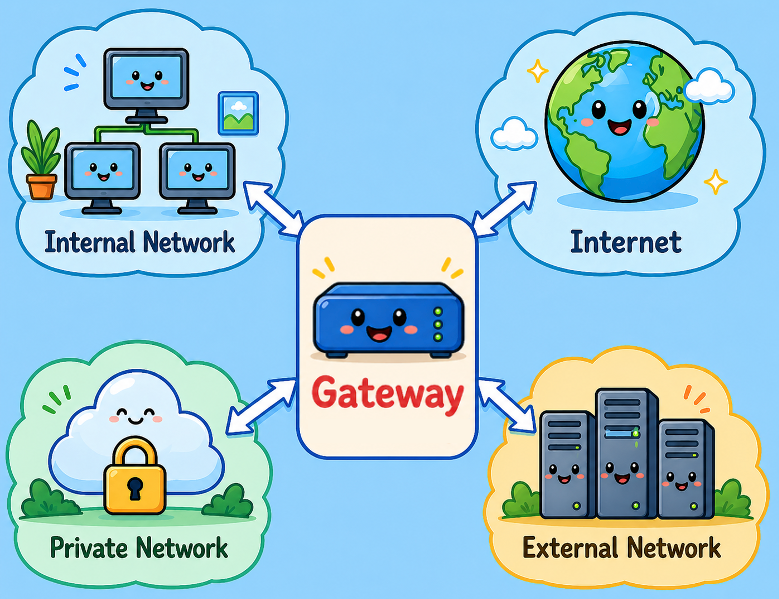
A gateway connects different networks, often using different protocols or addressing schemes.
In most everyday networks, the gateway is simply another name for your router: specifically, your default gateway, which forwards traffic toward destinations outside your local network. Think of the gateway as the exit ramp from your neighborhood onto the highway system.
Best use: Moving traffic between LANs and external networks (like the internet).
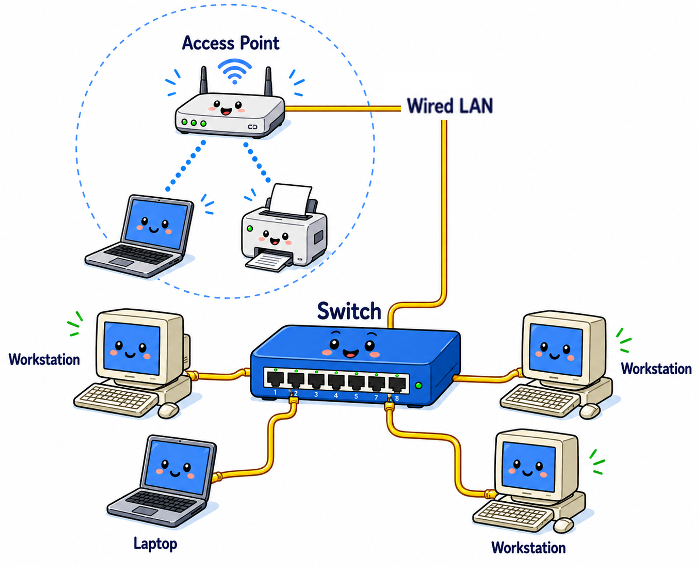
Access Point
A wireless access point (AP) connects Wi-Fi devices to a wired network.
It acts like a bridge between wireless and Ethernet environments, allowing laptops, phones, and tablets to join the LAN. Think of the AP as the network’s friendly translator between ethernet cables and radio waves.
Best use: Providing wireless connectivity across offices, campuses, and homes.
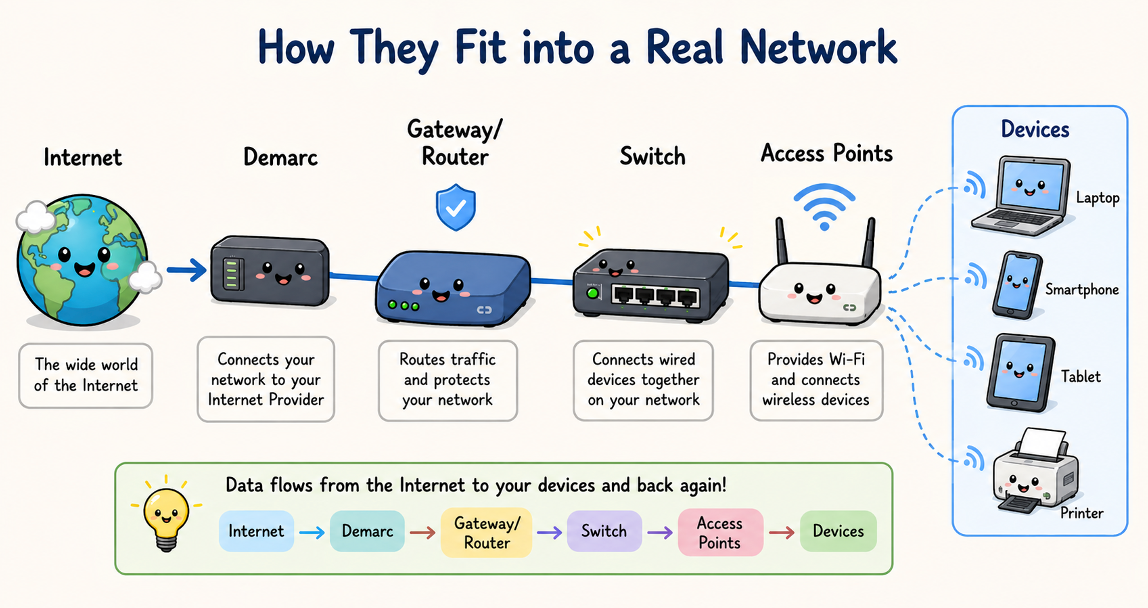
How These Devices Work Together
Here’s how they typically fit into a real network: Internet → Demarc → Gateway/Router → Switch → Access Points → Devices
Along the way:
- Access points extend the LAN wirelessly
- Switches connect wired devices efficiently
- Bridges (operating as multi-port switches) quietly keep traffic organized behind the scenes.
- Gateways move traffic between networks
- Demarc connects you to your Internet Service Provider (Note: this may replace your router/gateway entirely.)
In small environments, many of these roles are combined into a single device, for example, a home router that includes:
- gateway routing
- switching
- wireless AP capability
Enterprise networks often separate these roles for performance, security, and scalability.
When/How Should You Chain Them Together?
Here us a simple Use Case:
ISP → Demarc → Firewall/Gateway → Core Switch → Access Switch → Access Points → Users
Some points to remember:
- If coverage needs extending - add additional APs.
- If segmentation is required - use managed switches with VLANs.
- If networks must interconnect - introduce additional gateways or routers.
As a new engineer, the key insight is this: Networks aren’t built from one “magic box”. They’re built from cooperating specialists, each doing one job well.
And once you recognize which device performs what function, designing networks starts feeling much less mysterious, and much more like assembling a well-organized team!
===
===
Learn More
If you are still a bit confused about network equipment, a good starting point might be to consider CompTIA's Network Plus training. Details here.
If you want to learn more about our wireless training and wireless networks, visit our training portfolio page here
===
#WiFi #WirelessNetworks #Cybersecurity
===
About NC-Expert
NC-Expert is a privately-held California corporation and is well established within the Wireless, Security, and CyberSecurity industry certification training, courseware development, and consulting markets.
NC-Expert has won numerous private contracts with Fortune level companies around the world. These customers have depended on NC-Expert to train, advise, and mentor their staff.
So remember, if you are looking for the best IT training just call us at (855) 941-2121 or contact us
NC-Expert Blog