Strong Passwords and Protocols
Annually, the first Thursday of May has been designated as "World Password Day"... so, Happy Password Day!
We are constantly being told to make sure our passwords are secure, and create a secure password. But oftentimes, the same sources don’t clearly explain how to do this, and we are left puzzled and concerned about how to get it right.
Why worry at work ~ don't they have safeguards in place?
Probably, the biggest threat to enterprise is compromised credentials at scale: passwords that are phished, reused, or leaked and then replayed across many systems. Why this is the top risk? Most breaches now involve weak or stolen credentials, not exotic exploits, with reports citing over 80% of incidents tied to password compromise.
Massive dumps like RockYou2024 and other leaks have exposed billions of passwords, enabling credential stuffing and automated attacks against enterprise applications and VPNs. Because users heavily reuse passwords across accounts, one breach often opens multiple doors, turning passwords into a "breach multiplier".
Whether at home or at work, passwords are necessary and it is imperative to create them and store them properly so, in this blog, I will draw together information from some of the most reliable sources, examine the concepts, and explain how to create the best password(s) for your needs.
The National Institute of Standards and Technology (NIST) is a U.S. Government organization that is responsible for providing best practice guidance for Federal agencies and programs. It is a leading advisory for security guidelines and is a good place to start. I will also draw from the federal Cybersecurity and Infrastructure Security Agency (CISA) which is “the operational lead for federal cybersecurity”.
What is a Password?
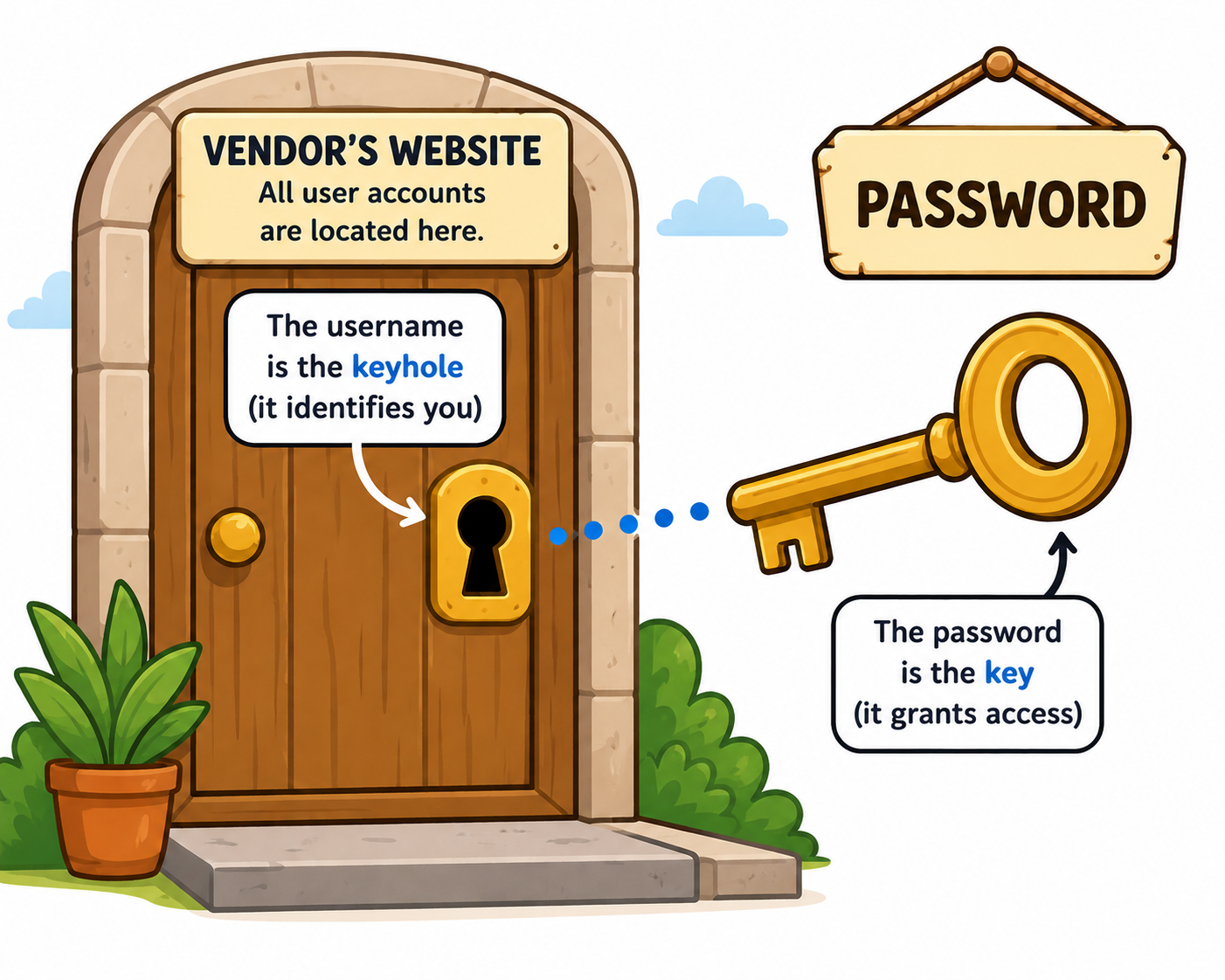
For every online account, there needs to be a label or name associated with it: something to define to whom (or what) it is associated or belongs. We call this a Username.
A Password is the partner to your username. It validates that you are the correct user match for the account name. You can imagine that your account username is a door and your password is the key to unlock that door.
In the early days of the Internet, passwords could have been fairly simple: a 5-digit code may have sufficed. However, as the internet has grown and cybercrime has increased so, too, has the need for more complex passwords to thwart the bad actors. Nowadays, we need stronger, more effective passwords.
Strong Password Creation
Rather than jumping ahead of ourselves, let’s start at the beginning: how do I create a strong password?
In the past, people used easy-to-remember passwords such as family member names, birthdays, anniversaries, pet names, hobbies, etc. The problem with these kinds of passwords is that they are easy to discover, especially since so many of us are intrinsically connected to social media. A quick search on any social media platform may reveal the names of family and friends, perhaps pet or hobby photos, and maybe even birth or anniversary dates. Further searches might show the organizations to which a person belongs and these may help identify work, school/university, or hobby connections. The wealth of personal data that is freely and easily available is quite disconcerting.
Substitution
Then we were told to create passwords which were more complex.
The problem with this, was that people used a standard set of replacements: @ for a, & for b, © for c, and so on. The same is true for numeric replacements with, for example, the number 3 replacing the letter E, 1 replacing the letter I, the number 5 replacing the letter S, using 7 for L, etc.
People tended to use the same logic, so they ended up keeping their original passwords, but just replaced some of the characters with either special characters or numeric substitutions: for example, the name “Debbie” might become D3&&13.
The bad actors realized this, and created computer programs that incorporated these standard substitutions. Then we were back at the proverbial "square one". So, what to do now?
People started adding special characters and extra numbers into these substituted words, which helped a bit: Debbie might become D_33*&&i^33. This is better and doesn’t make it quite as easy to crack, but it still isn’t really good enough.
Passphrases
Then the idea of a “Passphrase” rather than a password was established.
The difference between a passphrase and a password is that a passphrase consists of several straightforward dictionary words in a row, or a “string”. It was said that for a bad actor to guess, or “crack”, a passphrase consisting simply of four words, could take in the region of 200 years at 1,000 guesses a second! (But this is highly dependent on the equipment and the processing power that the attacker employs.)
The following is a graphic that was published on this subject...
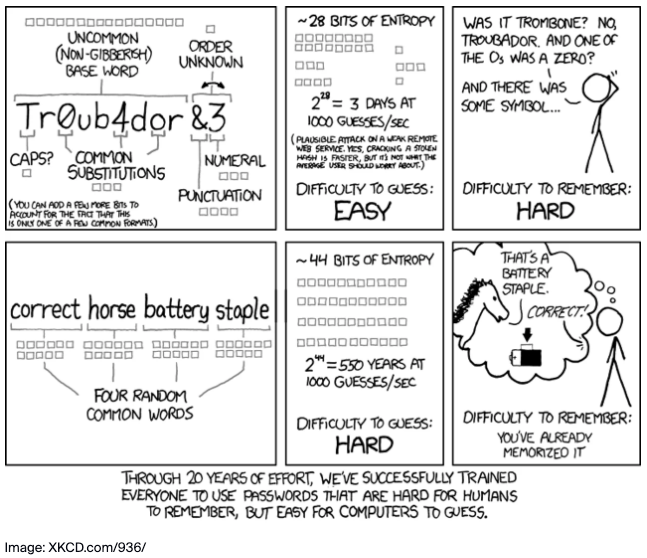
This idea was challenged, but the challenges were then refuted, citing the passphrase idea as being valid. The idea of passphrases is still recommended today. In fact, at time of writing, it is recommended to use 4-6 random, unrelated words in a passphrase. (Although you may be limited by the specific website as to word length.)
Important note: Now, while these four words appear to be secure, don’t be fooled into complacency. Because this cartoon is popular, threat actors will test for this passphrase, so this exact passphrase, or other combinations of these four words, should be avoided.
Now that you know how to create a strong password – oops! – how to create a strong passphrase, we can turn our attention to protocols.
Passphrase Protocols
There are a number of things you should and shouldn’t do when thinking about passphrases (and passwords). Here are some of them...
[1] Never use personal information (your name, family member names, birthdays, anniversaries, pet's names, etc.).
[2] Use a passphrase rather than a password (see above).
[3] Use at least 12 characters, better still, use at least 16! (Best practices currently recommend 16+ characters, but this changes regularly because the bad guys are getting better technology!)
[4] Do not share your passphrases with anyone.
[5] Use a different passphrase for each account – don’t reuse the same one in different places.
[6] Don’t store your passphrases on your computer – use an online password manager (there are many options to choose from).
[7] Never, ever, ever store your password, on a sticky, underneath your keyboard!
Observing these practices will help to secure your environment.
Latest Recommendations
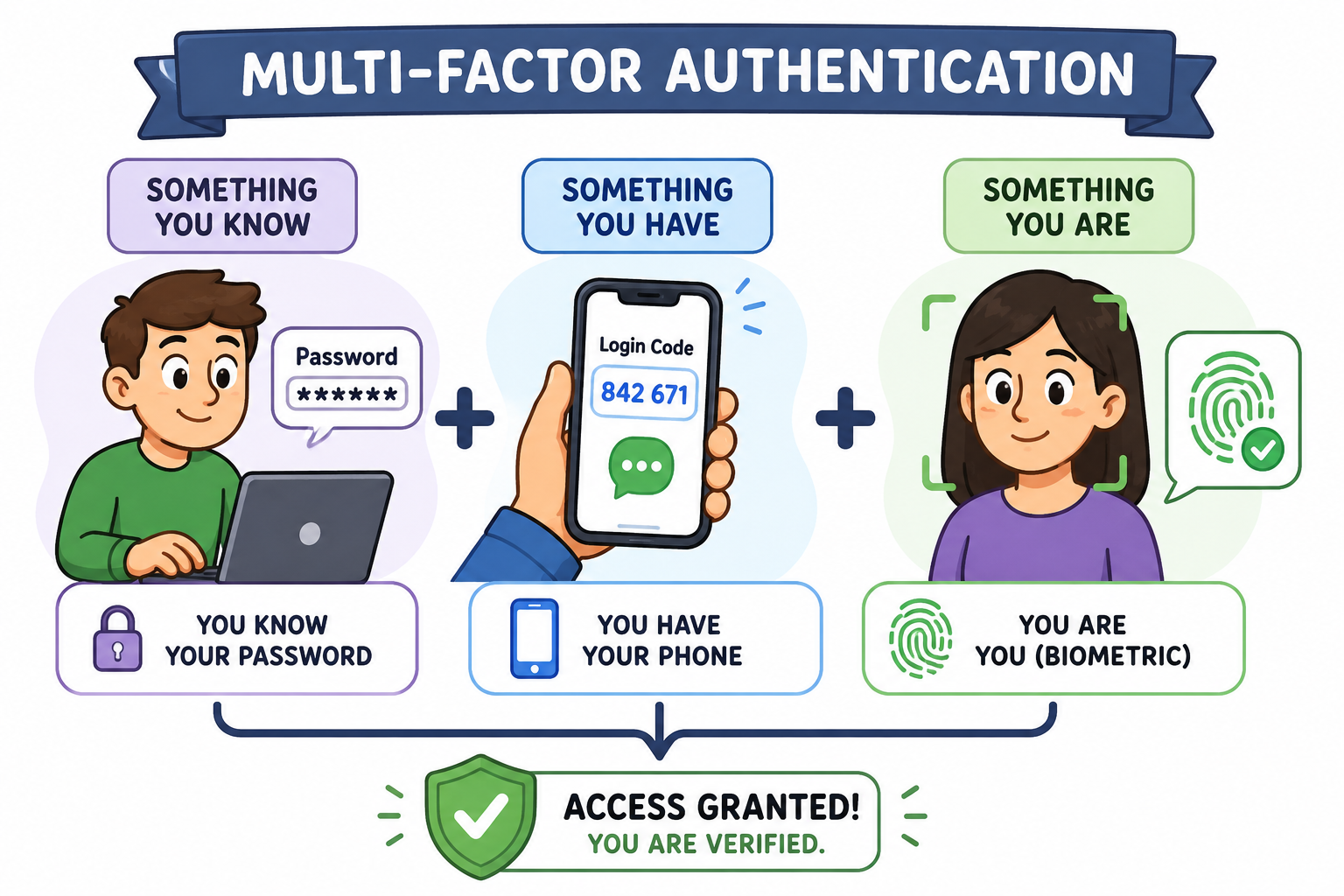
In order to add an extra layer of protection, advisors are currently recommending we establish Multi Factor Authentication, or MFA, otherwise known as Two-Factor Authentication, or 2FA. (The IT industry really loves its acronyms!)
So, in addition to a key for our account “door” it is recommended that we provide a further item of evidence that we are who we say we are.
This can come in the form of a texted code or an answer to a security question that we enter into a web portal or, if physical access to a building is needed, perhaps a finger or palm print scan may be required.
MFA/2FA can include a combination of two different items from the following options...
[1] Something the user knows: this could be your passphrase.
[2] Something the user has: this could be your phone to receive the texted code.
[3] Something the user
is: this might be a biometric, for physical access, such as a fingerprint scan.
Always, the idea is to stay ahead of the bad actors. As time progresses and more data breach information is available on the dark web, such as names, dates of birth, social security numbers, and even passwords you may have used in the past, we have to find further ways of securing our account access.
Securing your online presence is an ongoing process and must be treated with the perseverance that it demands. When we decide to take the shortcut for convenience, is when we expose ourselves to attack.
As is often wisely said by NC-Expert’s CTO, Phil Morgan, “Inconvenience is a hacker’s best friend!”
Stay safe out there!
===
Helpful Links
NIST: https://www.nist.gov/cybersecurity
CISA: https://www.cisa.gov/
Length vs Complexity graphic: https://xkcd.com/936/
===
How We Can Help
To begin the process of training your employees in cybersecurity procedures as efficiently and cost-effectively as possible, NC-Expert provides you with a 1-day starter training session from CertNexus: CyberSAFE ( here ). In this training, your team will be taught the basics of cyber security, and will be made aware of the fundamental traps into which many employees fall, inadvertently allowing attackers access into your system.
Or, if you are already conversant with basic security, you may consider CompTIA's Security Plus ( here ).
Once these trainings have been completed, we can provide further options, which increase in complexity as your employees progress up the access permissions chain.
Or you can view our Security training portfolio ( here ) .
We can provide standard training classes or can customize a program to suit your specific needs and budget. Our trainings are delivered by expert instructors, for individual employees (in our public classes) or for private groups, virtually/online (in real time) or at your site. Contact us for details.
About NC-Expert
NC-Expert is a privately-held California corporation and is well established within the Wireless and Cyber Security industry certification training, courseware development, and consulting markets.
NC-Expert has won numerous private contracts with Fortune level companies around the world. These customers depend on NC-Expert to train, advise, and mentor their staff.
If you are looking for the best in IT industry training then call us at
(855) 941-2121 or
contact us by email today.
This post appeared first on NC Expert .
NC-Expert Blog