Wi-Fi Myth Series - Myth #15: You Can Always Troubleshoot Wi-Fi Without a Packet Capture
Modern Wi-Fi systems give us an impressive amount of information.
Dashboards show signal strength, channel utilization, retry rates, client health scores, roaming events, application performance, access point statistics, and enough colorful graphs to make almost any troubleshooting session feel reassuringly scientific.
And all of that information is useful.
I’ll freely admit that most Wi-Fi problems can be investigated without immediately reaching for a packet analyzer. But “most” and “always” are very different words. There comes a point when a Wi-Fi engineer has to stop asking what the dashboard thinks happened, and start looking at what actually happened over the air. This is where packet captures enter the discussion.
A packet capture is not required for every Wi-Fi problem. If an AP has lost power, you probably don’t need Wireshark to confirm your suspicions, but when the problem involves association, authentication, roaming, retries, retransmissions, connectivity, intermittent performance, or strange client behavior, packet analysis can turn speculation into evidence.
Sometimes, you simply need to see the conversation, and what really happened, to resolve the issue.
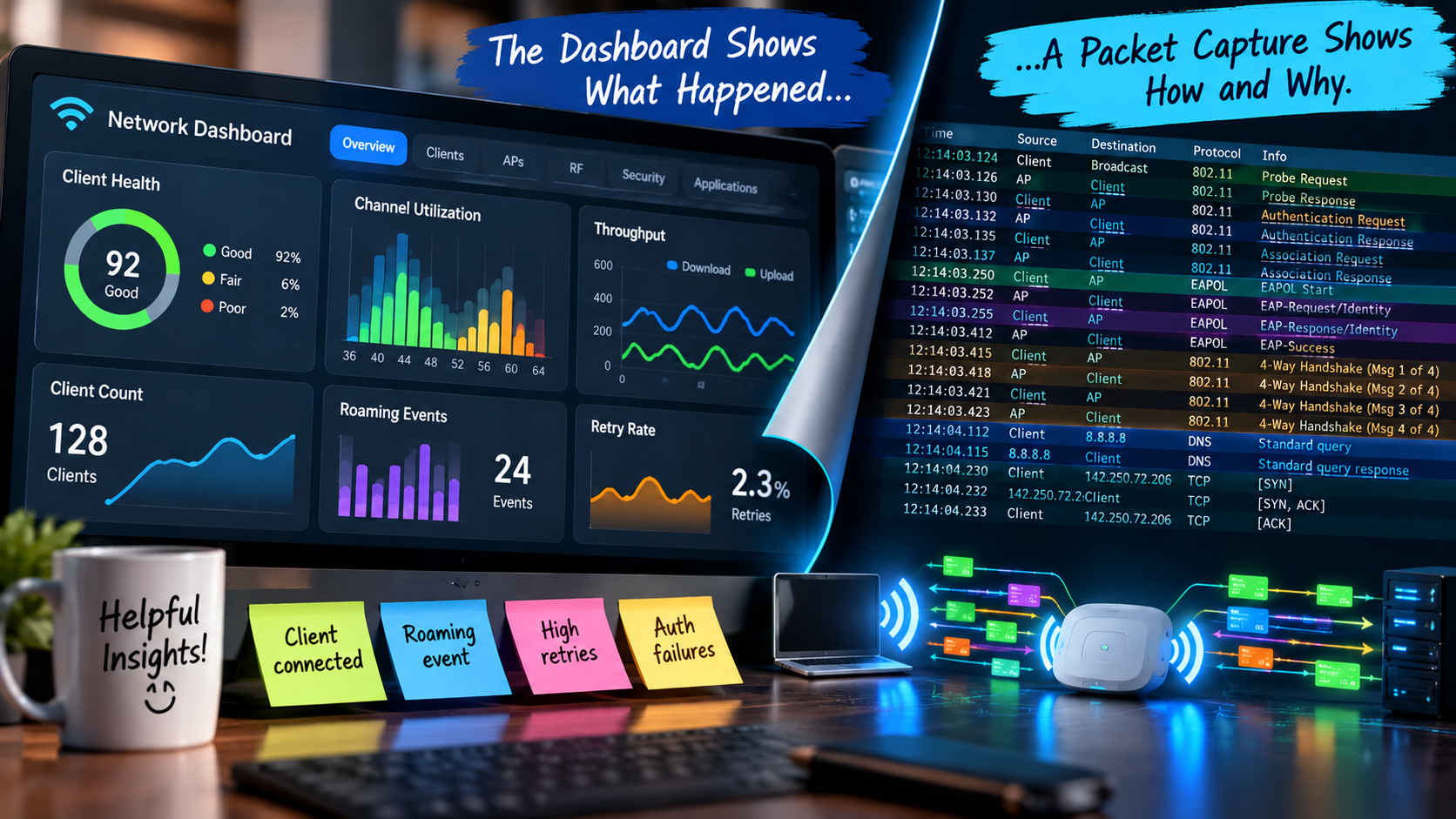
A Dashboard Tells a Story... But it is Only a Summary
Wireless management platforms have become remarkably sophisticated. They collect telemetry from APs, controllers, clients, switches, authentication systems, and cloud services.
Increasingly, AI and machine learning are used to identify anomalies and suggest likely causes, which is incredibly valuable, but it is wise to remember that dashboards generally present an interpretation of events.
The system collects information, processes it, applies logic, and presents the result in a convenient form:
- Client failed to connect
- Poor roaming experience
- High retry rate
- Authentication failure
- ...etc.
Are these assumptions useful? Absolutely. But the engineer’s next question should often be: Why?
To determine the answer may require that you look below the surface / summary.
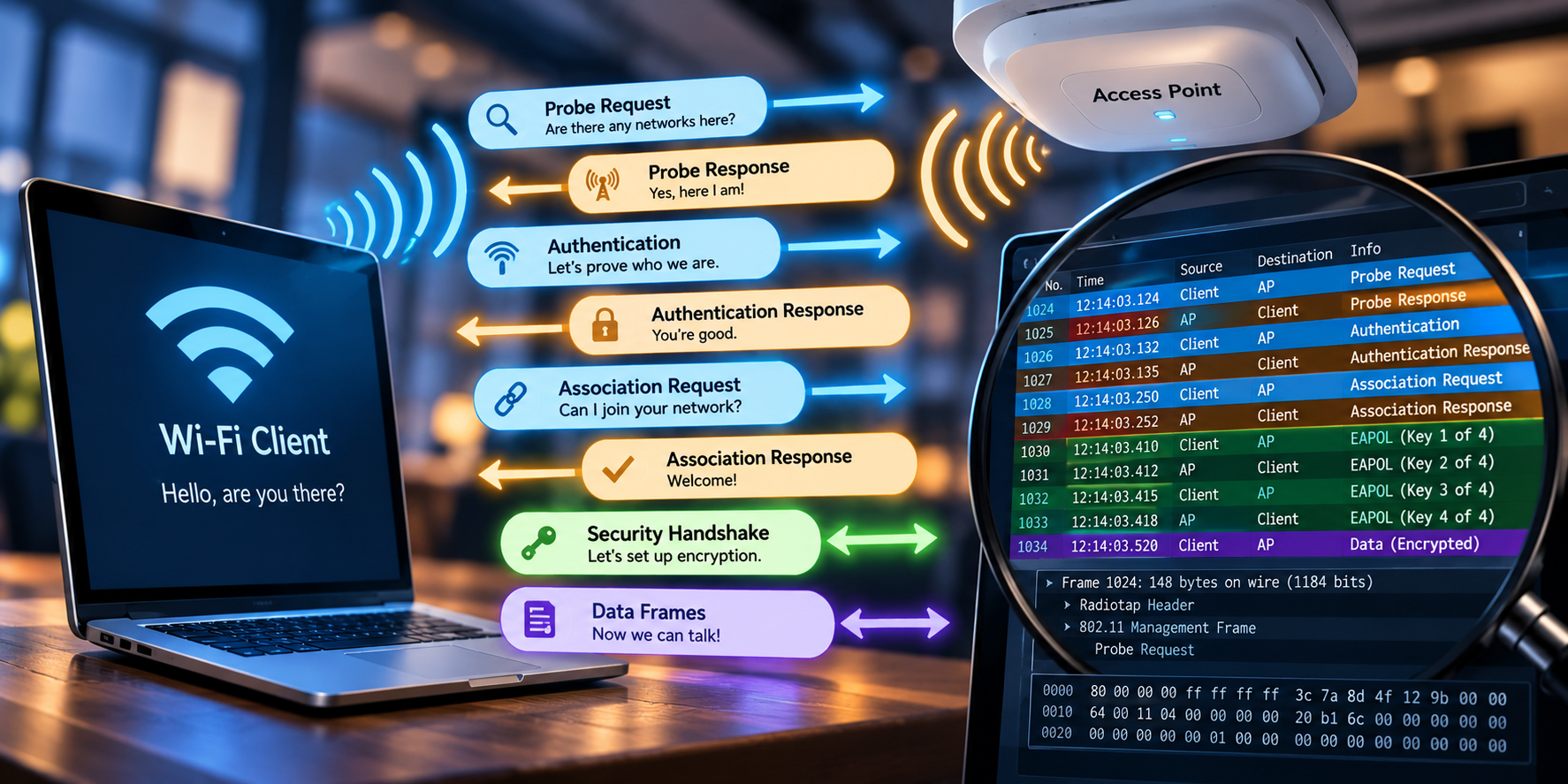
Sometimes You Need to See the Actual Conversation
Fundamentally, Wi-Fi is a conversation between devices.
Before a client starts happily exchanging application data, a lot has already happened:
- The client discovers networks
- Management frames are exchanged
- Authentication and association occur
- Security negotiations take place
- Addresses may be assigned
- The client may roam between APs as conditions change
When something goes wrong, packet captures can reveal where the conversation broke down:
- Did the client send the expected frame?
- Did the AP respond?
- Was the response delayed?
- Was the frame retransmitted?
- Did authentication begin but never complete?
- Did the client attempt to roam and get rejected?
- Was the client repeatedly probing while ignoring an apparently “excellent” AP?
A dashboard might tell you that the connection failed. However, a packet capture may show you the
sequence of events that produced the failure. This distinction matters.
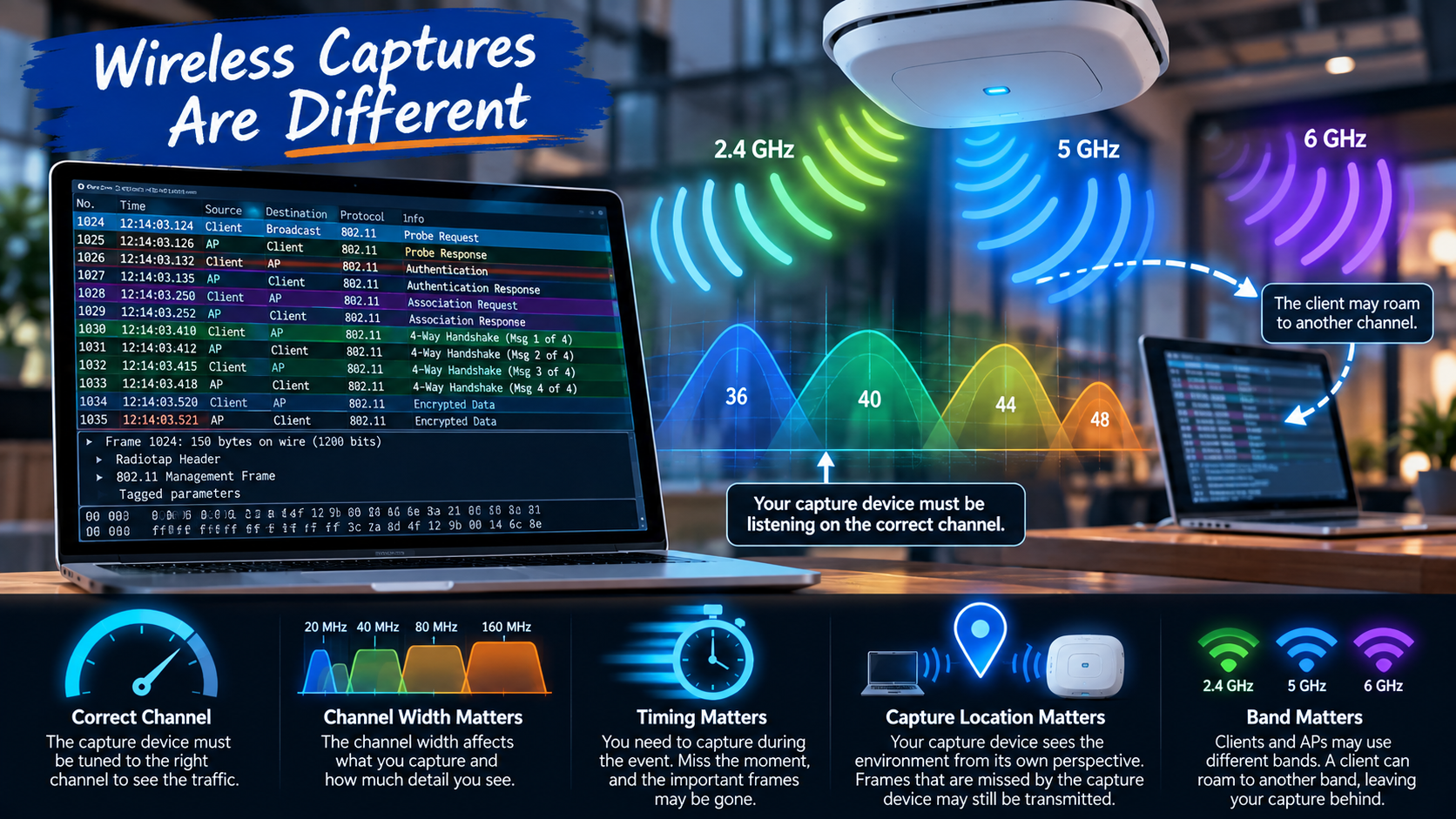
Wireless Captures are Different
Capturing Ethernet traffic is relatively straightforward. Wireless packet capture brings a few additional complications to the party:
- The capture device must be listening on the correct channel
- Channel width matters
- Band matters
- Timing matters
- Capture location matters
And, if the client roams to another channel halfway through the event that you are investigating, your beautifully configured capture may suddenly become a detailed record of everything... except the problem!
Wi-Fi really does enjoy keeping engineers humble, doesn’t it?! ;)
Capturing 802.11 traffic also exposes information that ordinary application-level testing cannot provide:
- management frames,
- control frames,
- retry indicators,
- sequence information,
- data rates,
- frame timing, and
- other clues about what is happening at the MAC layer.
This information can be enormously valuable when troubleshooting a behavior that appears “mysterious” from higher up the stack.
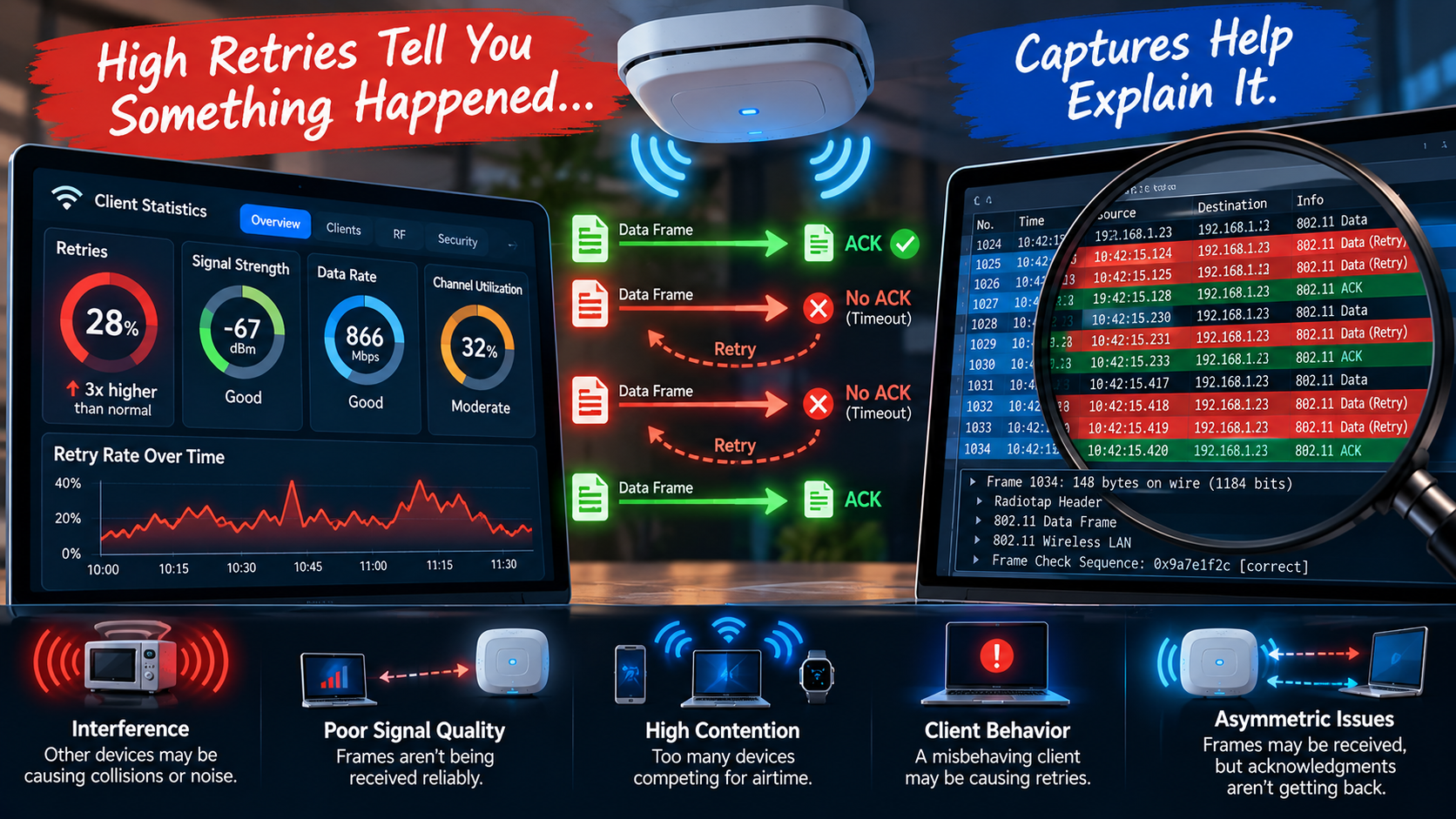
Retries Tell You “Something” Happened... Captures Help Explain It
Suppose your monitoring system reports an unusually high retry rate. This is useful information, but, remember, retries are only a symptom. Why are frames being retried?
Perhaps interference is preventing successful reception?
Perhaps signal quality is poor?
Maybe contention is excessive?
Could it be that a client is behaving badly?
Perhaps frames are being transmitted successfully in one direction, but acknowledgments are not, reliably, making it back?
The retry percentage alone cannot tell the whole story.
Packet analysis, combined with RF measurements and infrastructure telemetry, helps reconstruct what actually occurred. This combination is important.
A packet capture should not replace spectrum analysis, site surveys, controller data, client telemetry, or good engineering judgment. It serves to complement them.
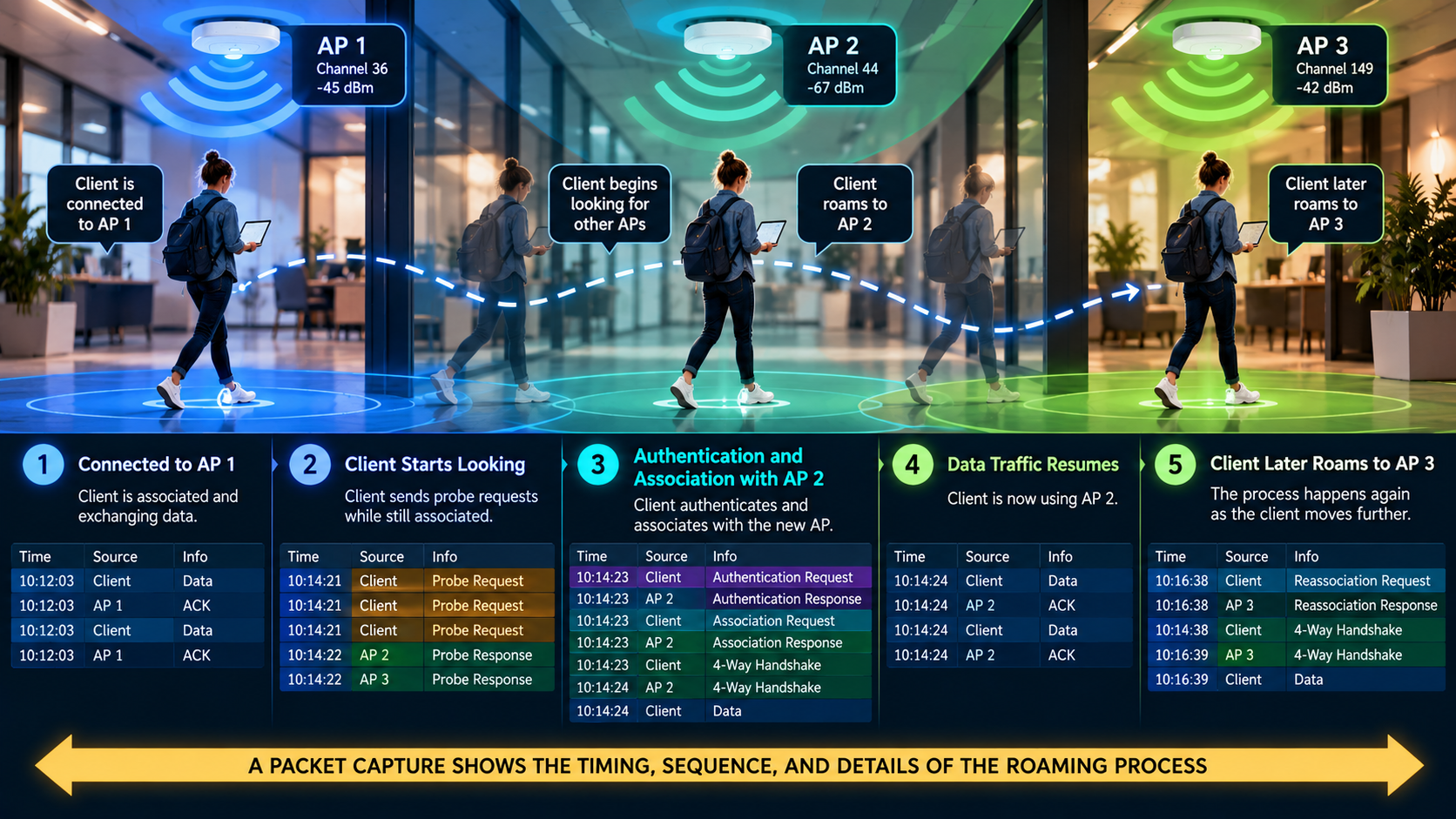
Roaming Problems are Especially Revealing
Few things generate more interesting troubleshooting conversations than roaming.
Let’s imagine that a user reports, “The Wi-Fi drops when I walk down the hallway.” The dashboard may report a roaming event, but a capture can help reveal the mechanics behind it.
When did the client begin looking for another AP?
Which APs did it discover?
How long did the transition take?
Did authentication introduce delay?
Did the client stubbornly remain associated with the original AP until the connection became unusable?
Remember: the infrastructure can encourage roaming behavior, but the client usually makes the final roaming decision.
Sometimes the network is waiting politely, while the client behaves like someone refusing to leave a party long after everyone else has gone home! ;)
The captured packets can make that behavior visible.
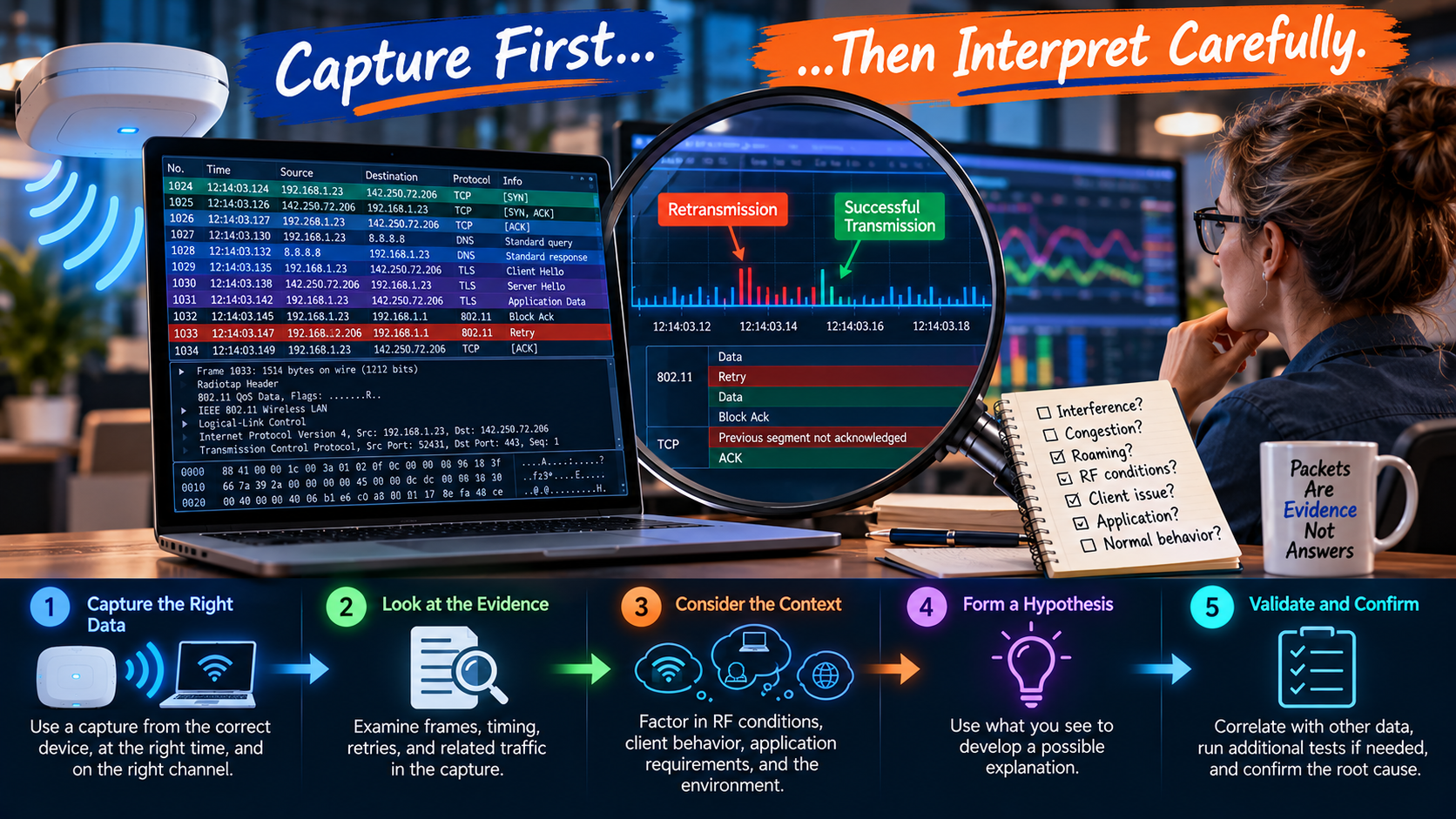
Capture First, then Interpret Carefully
There is one important warning to consider: packet captures contain data, not automatic answers.
Seeing a retransmission does not immediately tell you why it happened.
Seeing a deauthentication frame does not necessarily tell you what caused the underlying problem.
Missing a frame in your capture does not prove that the frame was never transmitted.
Your capture device has its own location, radio capabilities, receive sensitivity, channel configuration, and perspective. In other words, the capture is just another observer of the wireless environment... not an “all-seeing” witness.
Good packet analysis, therefore, depends on Context. (Extra note: Remember my talk at Wi-Co Cleveland?!)
Correlate captures with timestamps, controller logs, authentication logs, RF measurements, client information, spectrum data, and user reports whenever possible.
The goal is not simply to collect packets: the goal is to reconstruct the event.

Know When to Reach for the Packet Analyzer
Not every Wi-Fi problem deserves a packet capture.
Start with the obvious:
- Check configuration
- Look at RF conditions
- Review client statistics
- Examine channel utilization
- Verify DHCP and DNS
- Check authentication systems
- Look for infrastructure problems
But, when those tools tell you what happened without explaining why, it may be time to go deeper. This is the natural progression from performance measurement into real troubleshooting.
A speed test tells you the experience was poor.
A dashboard tells you the client had problems.
A packet capture can help show you what the devices actually said to each other while the problem was happening.
And, sometimes, that is the difference between troubleshooting and guessing!
Busting the Myth
Myth: You Can Always Troubleshoot Wi-Fi Without a Packet Capture.
Can you troubleshoot Wi-Fi without a packet capture? Of course you can! Most Wi-Fi problems can be investigated without immediately reaching for a packet analyzer. But most and always are very different words.
Can you effectively troubleshoot every Wi-Fi problem, without understanding packet analysis? That is a much harder argument to make.
Dashboards, health scores, telemetry, AI-driven insights, and performance tests are powerful tools. They help us identify symptoms, spot patterns, and narrow the investigation, but they are still views of the network.
When the easy answers run out, packet captures allow us to examine the actual exchange between devices... frame by frame, event by event. The best Wi-Fi engineers do not capture packets simply because they can. They know when the evidence they already have is not enough.
And when that moment arrives, sometimes the most useful thing you can do is stop looking at the dashboard... and listen to the conversation.
Myth = Busted!
***Helpful note:
if you want to see the images in better perspective, right-click on the picture, and select
Open Image in New Tab***
===
===
Learn More
If you want to learn more about our instructor-led IT training options, visit our training portfolio page here
===
#ITCareers #Certification #Networking #NetworkDesign #CareerDevelopment #ProfessionalDevelopment
===
About NC-Expert
NC-Expert is a privately-held California corporation and is well established within the Wireless, Network Design, Security, and CyberSecurity industry certification training, courseware development, and consulting markets.
NC-Expert has won numerous private contracts with Fortune level companies around the world. These customers have depended on NC-Expert to train, advise, and mentor their staff.
So remember, if you are looking for the best IT training just call us at (855) 941-2121 or contact us
NC-Expert Blog