Wi-Fi Myth Series - Myth #11: Interference Is Always Someone Else’s Wi-Fi
When Wi-Fi performance suddenly deteriorates, interference is often the first culprit to be suspected and, when this (interference) enters the conversation, attention tends to turn immediately toward neighboring Wi-Fi networks.
“Someone must have installed another AP.” “The office next door is probably using our channel.” “There are too many SSIDs around here.” Sometimes, this diagnosis is exactly right, but RF interference has a much larger cast of characters than just neighboring APs.
In fact, some of the most frustrating wireless problems occur when the interfering device isn’t speaking 802.11 at all! The spectrum doesn’t particularly care whether the energy occupying it came from an enterprise AP, a Bluetooth headset, a microwave oven, or something considerably stranger.
To a Wi-Fi radio trying to communicate, unwanted RF energy is simply unwanted RF energy.
Wi-Fi Has to Share the Neighborhood
The 2.4 GHz band has always been something of an RF “community center”. Wi-Fi operates alongside Bluetooth, Zigbee and other technologies, while various consumer, industrial, medical, and electronic devices may also generate energy within or around the same spectrum.
Microwave ovens are perhaps the most famous example. Their emissions can interfere with 2.4 GHz Wi-Fi, particularly when clients are operating nearby.
Bluetooth devices, cordless equipment, wireless cameras, sensors, and other transmitters can also contribute RF energy.
Some interferers transmit continuously. Others appear periodically. Some hop frequencies. Others produce wideband noise.
That last category can be particularly entertaining to troubleshoot... in the very specific sense of “entertaining” that wireless engineers use when they have been staring at spectrum analysis for three hours!
The important point is that interference doesn’t need to understand Wi-Fi to disrupt it.
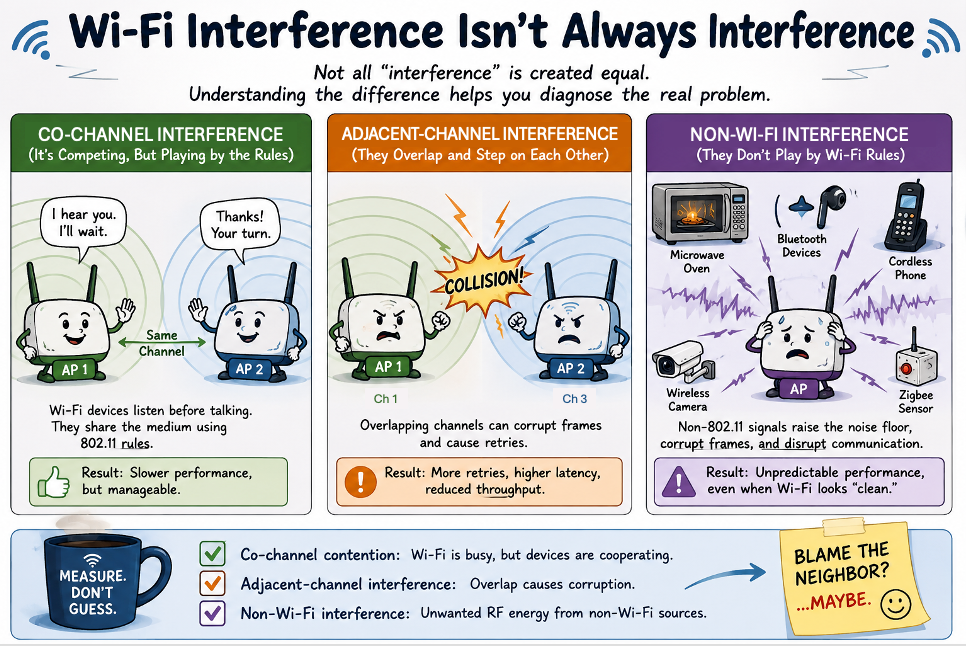
Wi-Fi Interference Isn’t Always “Interference”
There is also an important distinction between co-channel contention and destructive interference.
When two Wi-Fi devices can hear one another on the same channel, 802.11 provides mechanisms for sharing access to the medium. Stations listen before transmitting and defer when they detect that the medium is busy. This may result in poor performance, particularly in a dense environment, but the devices are at least playing approximately the same game.
Adjacent-channel interference is different. Overlapping transmissions can corrupt frames without providing the same orderly opportunity for medium sharing.
And non-Wi-Fi interference can be different again. A non-802.11 transmitter isn't politely participating in Wi-Fi's contention process. Depending on its characteristics and strength, its RF energy may:
- raise the noise floor,
- corrupt transmissions,
- increase retries,
- reduce usable airtime, or
- simply make portions of the spectrum extremely unpleasant places to operate.
Seeing high channel utilization doesn't automatically tell you why the channel is busy. This requires investigation.
Sometimes Your Own Network is the “Neighbor”
There is another uncomfortable possibility: the interfering Wi-Fi may be yours!
In dense deployments, excessive AP density, unnecessarily high transmit power, poor channel reuse, or overly wide channels can create substantial contention within the WLAN itself.
It is tempting to look at a neighboring company's APs and regard them as “hostile RF territory” while overlooking twenty of your own radios enthusiastically shouting across the same floor!
More APs don't automatically mean more usable capacity. Good RF design depends on:
- controlling cell sizes,
- channel reuse,
- transmit power,
- channel width, and
- contention domains
...and not simply increasing the number of radios.
Sometimes the troublesome neighbor lives in your own controller!
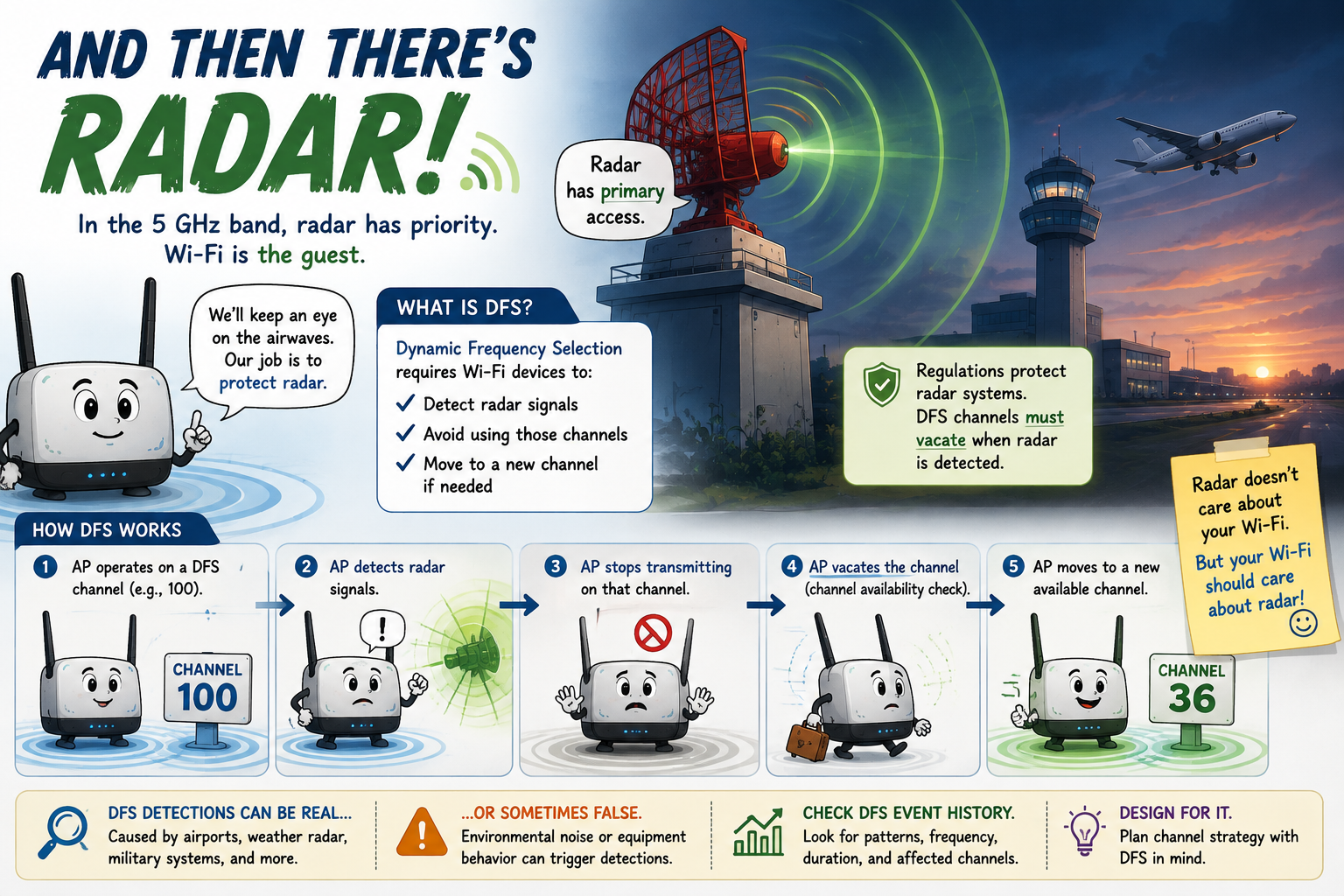
...And Then There’s Radar!
The 5 GHz band introduces another interesting participant to the line-up of suspects: RADAR
Certain 5 GHz channels are subject to Dynamic Frequency Selection (DFS), requiring Wi-Fi equipment to detect radar activity and vacate affected channels. Radar systems have priority access to that spectrum: Wi-Fi is effectively the guest.
For engineers working near airports, weather radar installations, military facilities, or other radar sources, DFS events can, therefore, become part of troubleshooting.
An AP changing channels unexpectedly isn't necessarily suffering from a defective radio or an overenthusiastic RRM algorithm. It may simply be doing exactly what regulations require.
Radar detection, itself, introduces another wrinkle: false detections can occur, which means your investigation may need to include DFS event history and vendor-specific detection behavior.
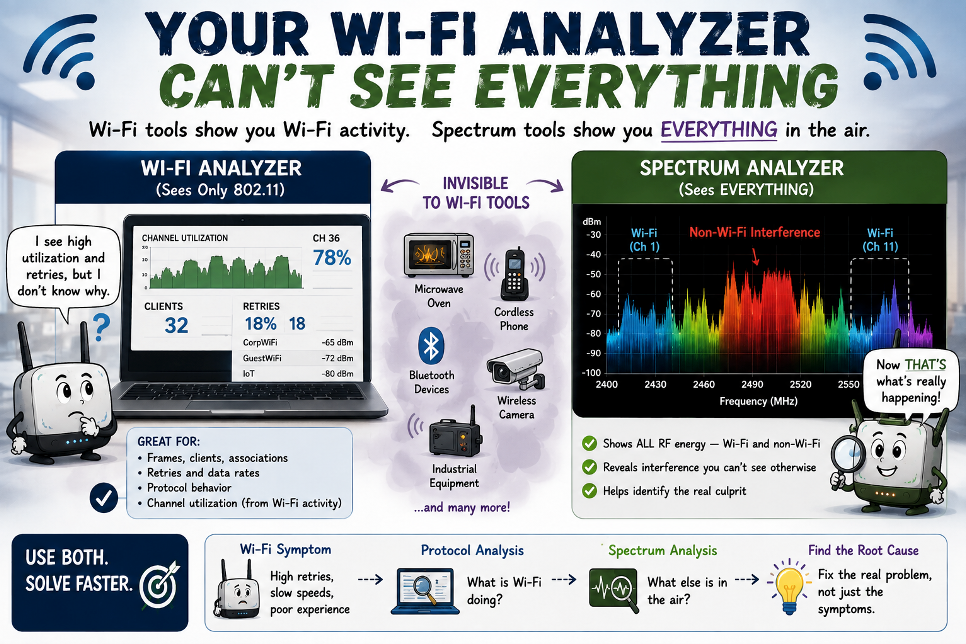
Your Wi-Fi Analyzer Can't See Everything
This is where troubleshooting tools matter. A Wi-Fi protocol analyzer is excellent for examining 802.11 behavior: frames, retries, associations, roaming, channel utilization, data rates, and other protocol-level information, but it can’t, necessarily, identify RF energy that isn't 802.11.
If the interferer is a microwave oven, a proprietary transmitter, a wireless video system, or another non-Wi-Fi source, you may need spectrum analysis to see what is actually happening in the band. The distinction matters.
Packet analysis tells you what Wi-Fi is doing.
Spectrum analysis helps tell you what RF is doing.
And, sometimes you need both.
This is also why troubleshooting exclusively from a controller dashboard has limits. The infrastructure may report high retries, poor SNR, elevated channel utilization, or deteriorating client performance... but those are symptoms. The RF environment may contain the explanation.
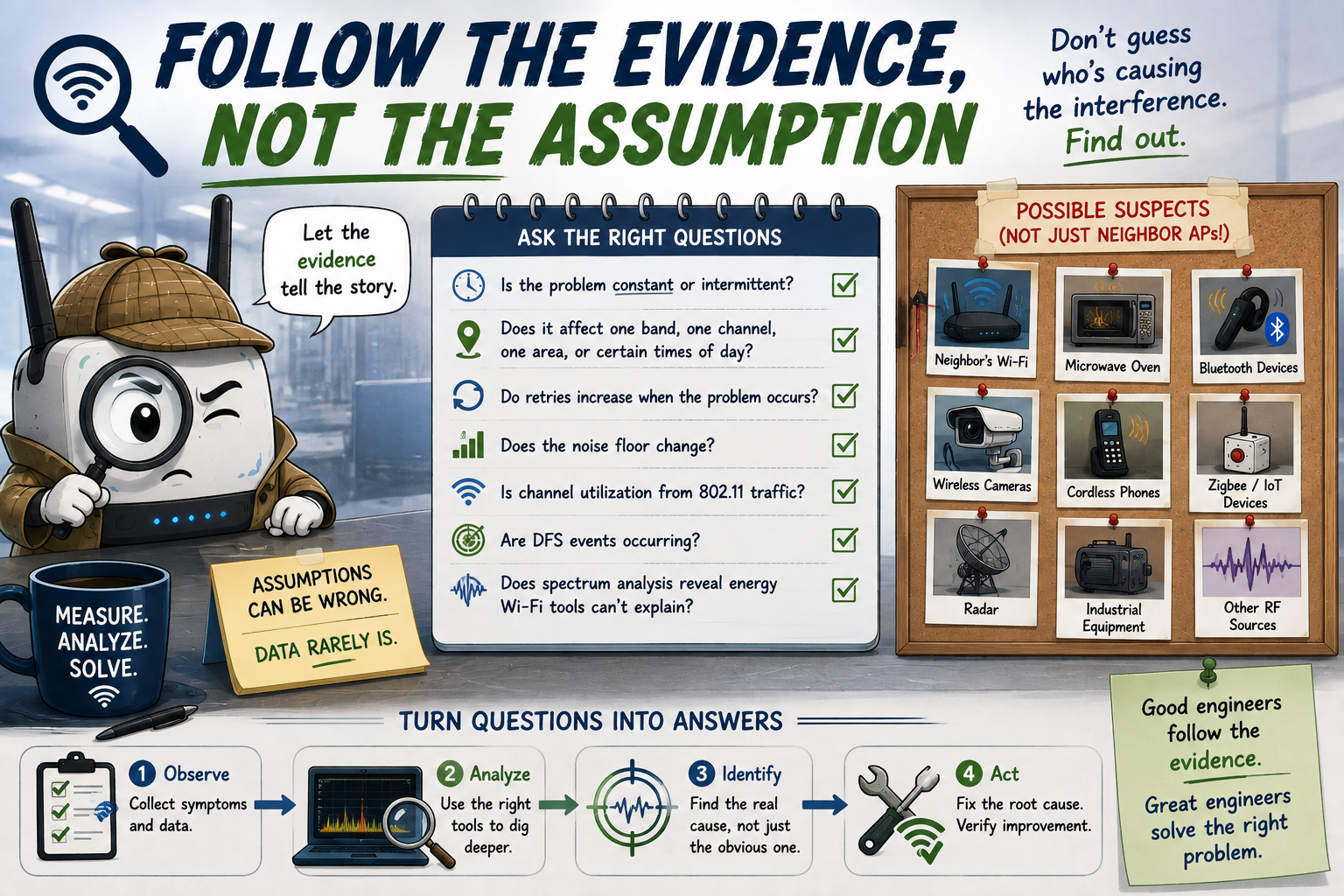
Follow the Evidence, Not the Assumption
When interference is suspected, resist the urge to immediately blame the AP visible on the other side of the wall. Instead, look at the pattern then ask yourself:
- Is the problem constant or intermittent?
- Does it affect one band, one channel, one physical area, or particular times of day?
- Do retries increase when the problem occurs?
- Does the noise floor change?
- Is channel utilization coming from recognizable 802.11 traffic?
- Are DFS events occurring?
- Does spectrum analysis reveal energy that your Wi-Fi tools don't explain?
... these questions gradually turn “interference” from a convenient explanation into a measurable RF problem, and that is the important difference.
Busting the Myth
Myth: Interference Is Always Someone Else’s Wi-Fi
The best Wi-Fi engineers don't begin by deciding what the interferer is, instead, they measure the environment and let the evidence tell them.
When troubleshooting wireless networks, the mystery signal doesn't always have an SSID. It could potentially be Bluetooth, radar, a microwave oven, wireless video equipment, an industrial device, or another RF source that’s sharing the spectrum.
Sometimes, the cause of interference really might be neighboring Wi-Fi but, at other times, it’s your own!
Myth = Busted!
===
===
Learn More
If you want to learn more about our instructor-led IT training options, visit our training portfolio page here
===
#ITCareers #Certification #Networking #CompTIA #CWNP #CyberSecurity #CareerDevelopment #ProfessionalDevelopment
===
About NC-Expert
NC-Expert is a privately-held California corporation and is well established within the Wireless, Security, and CyberSecurity industry certification training, courseware development, and consulting markets.
NC-Expert has won numerous private contracts with Fortune level companies around the world. These customers have depended on NC-Expert to train, advise, and mentor their staff.
So remember, if you are looking for the best IT training just call us at (855) 941-2121 or contact us
NC-Expert Blog